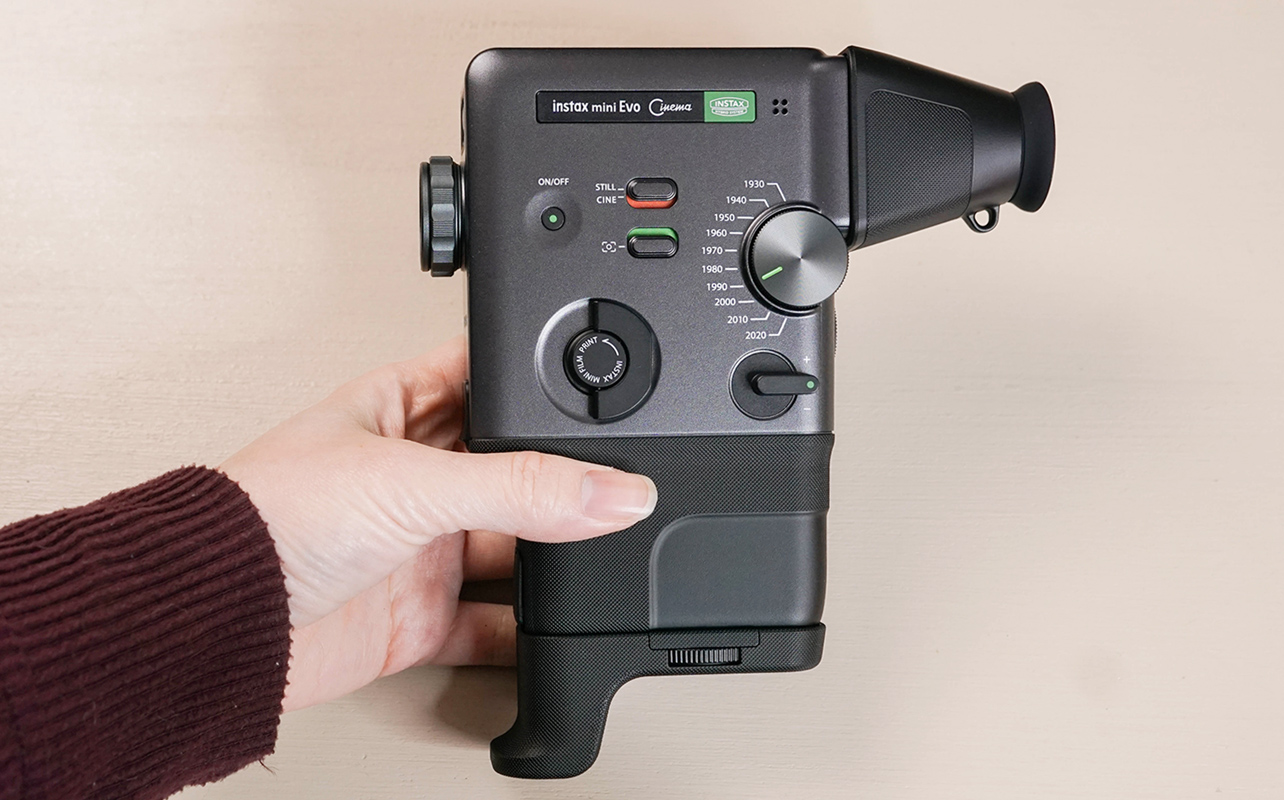
Capturing the moment is easy, but staying in it is hard. Fujifilm has come up with a way to capture not just one moment but many with the Fujifilm Instax Mini Evo Cinema, a camera that both prints stills and records video. It takes you through the past 100 years of film history with its Gen Dial, letting you capture and film in decades you miss—or decades you’ve only ever dreamed about.
Keep reading to find out what makes this camera so special.

What’s in the box of the Fujifilm Instax Mini Evo Cinema?
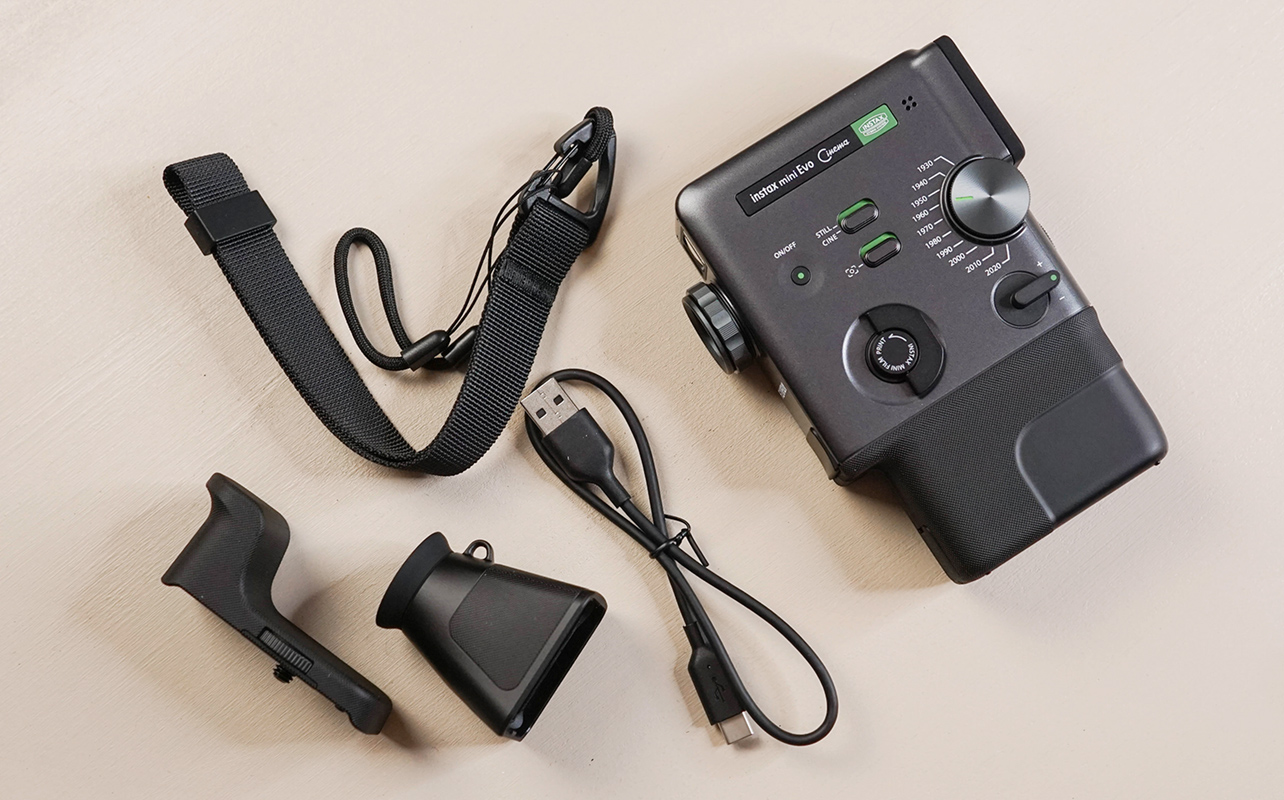
In the box of the Fujifilm Instax Mini Evo Cinema, you’ll find the camera body, a USB-C charging cable, a camera strap, and two camera accessories. One is a viewfinder, which magnifies the camera’s LED display and turns it into an optical viewfinder. The other is a lower camera grip, which screws into the camera’s tripod mount to give the camera a firmer grip and more of a vintage silhouette.
What makes the Mini Evo Cinema so special?
The Mini Evo Cinema is Fujifilm’s first-ever foray into instant video. It’s a novel departure from instant still photography, with a design that looks nothing like past Instax cameras. The camera body and vibe are a modern take on 8 mm film cameras like the Super 8, which dominated the aesthetic of the 1960s.
If you’re a film buff, you’ve seen 8 mm shots before. At minimum, you’ve seen facsimiles of them. They’re dramatic, grainy reels with beautiful, washed-out colours that are often highlighted by light leaks and choppy transitions. Many of today’s filters are based on 8 mm footage, with its yellow-green lean and gorgeous grain.
The Mini Evo Cinema’s key features
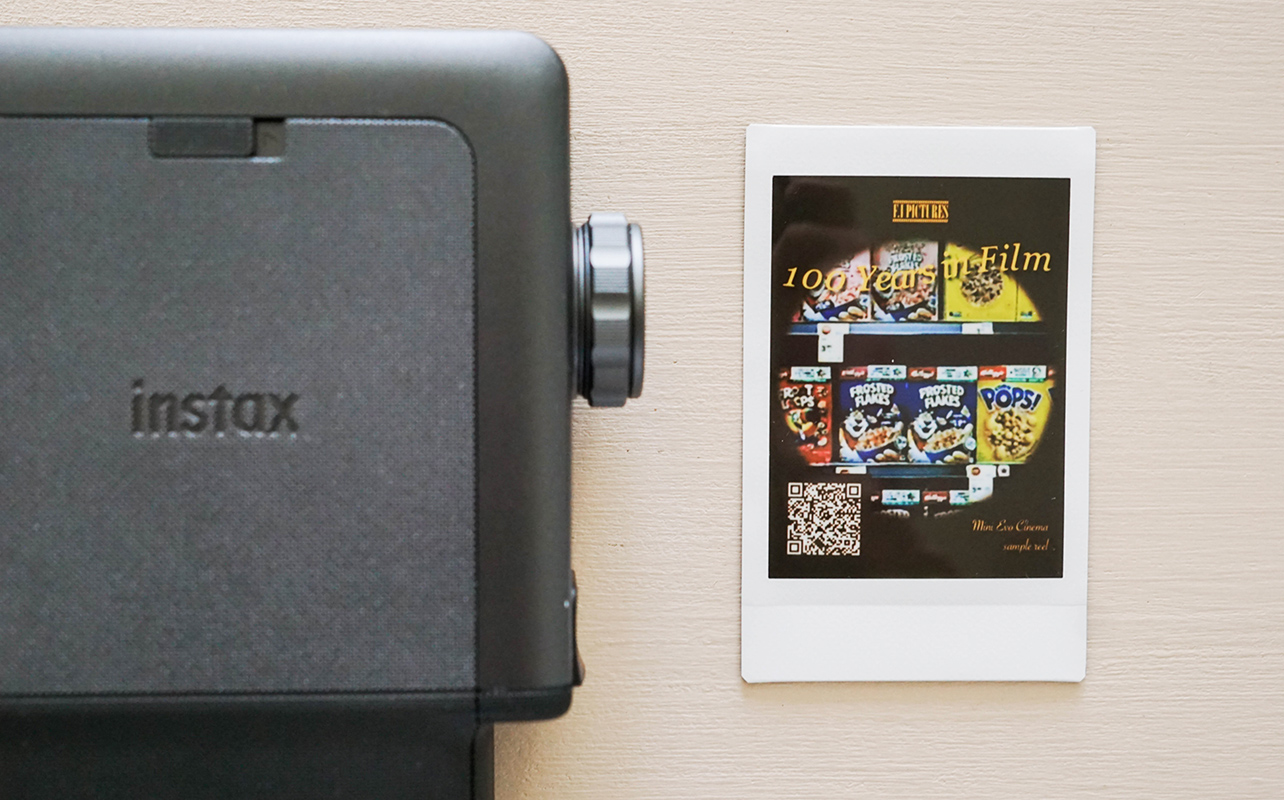
Unlike the rest of the Fujifilm Instax line, which focuses on still photography, the Mini Evo Cinema blends still photography with moving pictures. It can record video clips of up to 15 seconds at a time and prints instant images with QR codes that link to the video clips. (Clips are available for two years after they’re created.) The Cinema shoots forward, through the depth of the camera, and creates brief video clips that can still be impactful and aesthetic.
Fujifilm is marketing the Mini Evo Cinema as a 3-in-1 camera, which I agree with. Not only does it record video, but it also shoots and prints stills. It’s a new, interesting way to capture a moment in an instant, even if that instant is in motion.
Like the original Mini Evo, the Cinema’s filter offerings are robust. It comes with two dials (Generations and Degree Control), two switches (Frames and Cine), and two print modes (Rich or Natural). It captures in 5MP detail, prints at 318dpi, and has both Single Autofocus and Facial Recognition Autofocus.
Fujifilm’s Gen Dial and Degree Control Dial
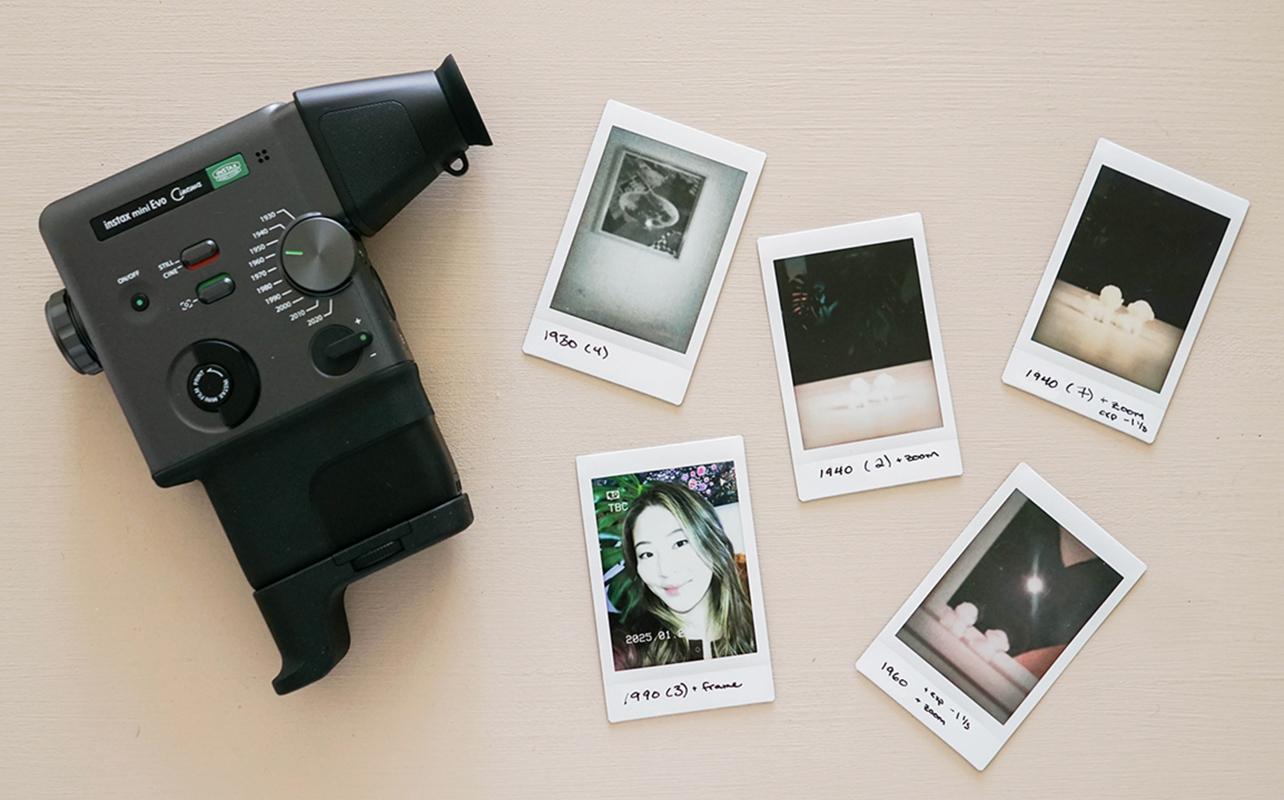
The Mini Evo Cinema’s Gen Dial offers 10 filters, each meant to capture the aesthetic of a different decade. Called the “Eras Dial” in some countries, it filters still images, video, and audio. The Gen Dial starts roughly 100 years ago.
- 1930: High-contrast black-and-white film effect
- 1940: Aged, high-contrast colours
- 1950: Washed-over black-and-white film, with lots of midtones
- 1960: Moody hues in desaturated colours
- 1970: Blue-washed, hippie-era hues
- 1980: Green-washed, vibrant colours
- 1990: Desaturated colours reminiscent of handheld video cameras
- 2000: Clear, highly filtered video
- 2010: Instagram-era filtering
- 2020: Sharp, rich, ultra-crisp imagery
The Cinema’s Gen Dial is moderated by its Degree Control Dial. The Degree dial, placed around the camera’s front lens, rotates to adjust each Gen’s colour, contrast, and noise level. It creates 10 unique variations within each Gen. This is similar to the Intensity dial from the Fujifilm Instax Wide Evo, reviewed here, which I also really loved. (The Wide Evo’s Intensity dial offers variation in addition to intensity; the Mini Evo Cinema’s Degree dial is purely to control the intensity of your Gen Dial filter.)
Fujifilm’s Frame Switch, Cine Switch, and Zoom lever
The Cinema’s Frame Switch works as an overlay. It toggles era-appropriate details on and off, like a date stamp and “PLAY” text on a 90s Gen image.
The Cinema’s Cine Switch toggles between still images and video mode. You can capture about 50 stills or 10 videos on the camera’s built-in memory, but you can expand its memory with a microSD card. (An important note: The camera can only access its internal memory or the microSD’s memory at one time, not both at once. The microSD will take precedence.) Cinema is where this camera is designed to shine, and even beyond that, it’s made to be used with the Cine switch turned on and the Instax Mini Evo app open on your smartphone.
One other toggle that’s nice to see in physical form on the Instax Mini Evo Cinema is a physical zoom lever. It allows you to zoom in during a video or before capturing a still, and it feels really 90s—like I’m playing with my parents’ old camcorder again.
Instax’s Mini Evo app
The Mini Evo Cinema is designed to be used with the Instax Mini Evo app. With it, you can store countless videos, edit together multiple videos to make mini movies (up to 30 seconds long), create movie posters from your video’s still images, and print out stills with functional video QR codes.
The app works seamlessly with the Cinema. The camera pairs quickly and easily, with a stable connection that automatically re-connects every time you turn your camera on. It makes it easy to store, reorganize, and edit your still images and video clips, transferring them from your camera to your smartphone in seconds. You can also use the Mini Evo app to print or re-print photos (including ones from your camera roll), and you can view and control your camera screen from within the app.
Instax Rich vs Natural Mode
Offered on most of Fujifilm’s recent Instax cameras, the Cinema prints in either Rich Mode or Natural Mode. Rich prints will give you that classic Instax effect—high-contrast, creamy, and punchy. Natural prints intentionally tone that effect down, printing with results that are more like what you’d see on your smartphone.
I personally always print in Rich Mode. I love the vintage vibe it gives, and I feel like Rich Mode is what makes Instax prints so special.
My experience with the Fujifilm Instax Mini Evo Cinema
The Instax Mini Evo Cinema is a lot of kitsch and nostalgia—but in a good way. It’s fun to use, with excellent app integration (honestly, some of the best I’ve ever seen) and easy-to-use functionality. Each Gen filter really feels like the era it’s from, and the dials and toggles on the Cinema feel precise and mechanical.
The still functions on this camera are fairly seamless, with a super-sensitive capture trigger and a clear screen that works well for both distanced and up-close (digital optical viewfinder) viewing. I really like that you can easily view each photo’s details in the camera’s playback, including its exposure, Gen, and Degree. However, there’s a fair amount of lag between settings, which I don’t love.
The film functions of this camera are surprisingly fantastic. It’s easy to record multiple clips, stacking them one by one before saving. You can’t change your filter or filming settings mid-recording, but if you want to use multiple, you can edit and/or join clips in the Instax Mini Evo app. Instax’s “movie poster” presets are cute and easy to customize (if you choose to use them), and printing from the app is very seamless. There’s very little lag while filming and editing overall, even if you’re using your smartphone as a controller.
Trading staying in the moment for capturing the moment
I really enjoyed using the Mini Evo Cinema. However, like other Instax Evo cameras I’ve tried, I felt like it involved a bit of a trade-off. You have to do a fair amount of tweaking your filters, combining multiple settings, and waiting for the settings to load before you can capture and print. So, while the Cinema creates absolutely stunning photos, it can take time to capture them.
This camera pulls me somewhat out of the moment as a result, which goes against what I’ve always felt was at the core of the Instax brand: The ability to create a keepsake while staying in the moment. In exchange, you get a photo or video that’s far more beautiful and detailed than something you’d capture with your smartphone or an Instax Mini. For detail-oriented instant photo lovers, that trade-off will be worthwhile; for casual users and kids, likely not.
Is this the instant camera for you?
The Fujifilm Instax Mini Evo Cinema is a one-of-a-kind product that’s just hitting the market now. It’s available starting February 9th, 2026 for those who want a unique experience that melds digital photography, analog printing, and old-timey cinema vibes.
You can pre-order yours at Best Buy Canada here to be one of the first to experience it.