The era of cable TV is over. While almost every Canadian household with a TV had a cable TV subscription 10 years ago, that number has steeply fallen since the introduction of streaming television. A recent Convergence Research study published in 2024 reports that 42% of Canadian households no longer have a TV subscription through a cable provider. At the same time, over 80% subscribe to a streaming service. Those households aren’t all just forgoing all of their sports watching in the post-cable era, so how do you watch sports without cable?
The answer to this question, for most people, is streaming. You can still watch every big game in real time on your TV, even without cable. Get ready to watch sports games this year with Best Buy’s Watch Party celebrations.


Can you watch sports without cable in Canada?
Absolutely. Nowadays, more and more Canadians are relying on streaming apps and services to watch sports games and matches. You can catch both live and pre-recorded games through a variety of apps and websites. Plus, they’re ready to be viewed or cast onto your smart TV.
The availability of each stream will depend on what you’re watching. Just like how certain cable networks only show certain sports, certain streaming services only show certain sports. However, access is easier than ever—you can stream many of these games on your TV, laptop, phone, and tablet. You’re no longer limited to a wired-in television like you were 10 or 20 years ago.
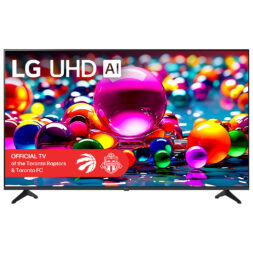
Stream from your TV
Access streaming apps right from your television with a smart TV. (This one features 4K ultra HD resolution. It’s also the official TV of the Toronto Raptors and Toronto FC, which are both honours that I didn’t know existed until this very moment.
Main ways to watch sports without cable: Sports streaming apps
The main way to watch sports without cable is by using a dedicated sports streaming app or website.
Network and broadcaster apps
Some network and broadcaster apps offer live sports coverage to all—even without a cable subscription. Apps and websites like CBC Gem/CBC Sports offers free coverage for many major sporting events to all Canadians. They’re a go-to for many when it comes to international sporting events.
You can watch CBC content and sports in Canada through the CBC Gem app, even without a subscription. You’ll need to create an account first, but you can use your free account to watch live TV, stream shows and sports, and watch shows, movies, and more. You can upgrade to a premium account to access a broader catalogue of ad-free programming, but it isn’t necessary for watching live sports.
As a Canadian, I’ve always felt like the CBC Gem app is the closest we’ll ever get to truly free programming. If you want more beyond its catalogue, you can often access more (for free) through your local library!
Sports streaming services
The top five sports streaming services in Canada for watching sports without cable are DAZN, Fubo, Sportsnet+, TSN+, and ESPN (in the case of ESPN, however, a VPN subscription would be required, as it is not officially available in Canada). You pay for each one separately, and each one offers a different amount of content. The majority is sports content, but some sports apps host non-sports content, too. The best sports streaming app in Canada varies from person to person. You’ll have to determine which one works best for your needs. The answer to “how to watch football in Canada” will likely, for instance, be different if you’re talking about American football or European football (soccer).
In general, sports streaming services are much cheaper than a monthly cable subscription. They’re like paying for one channel, not dozens or hundreds. For many, it’s an easier, cheaper way to watch sports than with a traditional cable subscripiton.
Something to remember: Some sports are split within leagues. You may need multiple subscriptions (for instance, to both Sportsnet and TSN) to watch every game of a particular season. There is no one best sports streaming service in Canada, and if you’re determined to catch every single game, you may need to layer your subscriptions.
League-specific platforms
League-specific platforms allow dedicated access for specific sports—for instance, sites like MLB.TV for watching baseball, or the NFL+ for watching football. If you only watch select sports, these platforms can be a great option for your streaming at home.
In some cases, streaming services and league-specific platforms are linked to specific devices. They may only be available as apps (not websites), or may work best on a smart TV or streaming device. It’s important to make sure your setup will work well with your chosen streaming service.
Streaming live sports on smart TVs
Smart TVs are a go-to for sports fans who want the experience of cable TV without cable TV prices. They allow you to navigate to an app right on your smart TV and watch sports games (live or, often, pre-recorded). You can use a remote to navigate the entire experience rather than your smartphone, which can feel more seamless for many users.
To stream sports from your smart TV, you’ll still sign up and pay for a streaming app like you would above. However, you’ll aim to download that app to your TV rather than controlling it from your smartphone every time. (This can also be a great option for users who prefer to search for apps and games with voice search, which is available on many smart TVs.)
Using media streamers to watch sports without cable
Media streamers like the Roku Streaming Stick, Amazon Fire Stick, Google TV Streamer, and Apple TV are another popular way to access streamed sports games. They serve as a simple way of accessing your major sports apps, very similarly to how you would with a smart TV.
Streaming sticks are a way to turn an older TV into something that works like a smart TV. They offer plug-and-play setup and easy navigation, and they’re a portable way to take your sports viewing with you.
Even if you already have a smart TV, a streaming stick may still be a good choice for upgrading your experience. Plugging a media streamer into an older smart TV can give you access to apps that may be incompatible with its version—without the price tag of a brand new new television. They’re a great option if you’re trying to figure out how to watch sports in Canada without cable.
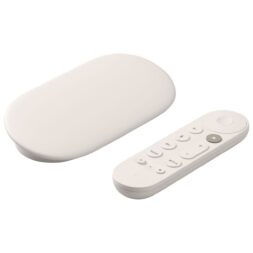
Achieve easy, portable navigation with a media streamer
Unlike a smart TV, which is fixed in one place and hard to move, you can pack your media streamer in your bag to take with you on trips, vacations, and friends’ houses. As an added bonus, your streaming stick experience will remain consistent: If you know how to navigate it on one TV, the navigation will look the same on the next.
No matter how you watch, here’s what you’ll need before game day
No matter what you’re using to watch sports at home, there’s an easy, flexible solution out there for you. From smart TVs to media streamers, cable-free sports setups can be as intensive or as bare-bones as you’d like.
Here are a few tips to get set up before game day:
- Set up your streaming accounts in advance. It takes time to pick the right ones, set up your subscriptions, and get logged in. Make sure you’re subscribed, set up, and logged in before the day of the big game.
- Check your compatibility. Make sure the apps you plan to use are supported by your smart TV or media streamer, or that your phone or smart device can cast directly to the screen you want to play the game on.
- Ensure you have a reliable internet connection. Freezing and lagging is no fun, but that applies even more so for live sports events and HD streams.
- Double check your audio setup. Is the audio in your media area clear and crisp enough to make out both the gameplay and the commentary? If not, check out my guide on sound bars vs surround sound to see how you could upgrade your setup.
Setting up your cable-free sports viewing takes a bit of time, but it’s a fairly simple, streamlined process. Plus, once you’re set up, the future is pretty hands-off! Whether you’re using a smart TV, smartphone app, streaming website, or media streamer, there’s a way for you to watch all the sports you love—hassle-free and cable-free.