
For a long time, wearing a pair of Oakley sunglasses indicated you were up to something athletic or outdoors-y. That doesn’t change with the Oakley Meta AI Glasses, this time bringing together the brand’s focus on performance eyewear design with Meta’s growing AI platform. Like the Ray-Ban Meta glasses before them, these smart glasses combine a built-in camera, open-ear audio, voice controls, and Meta AI into frames you can wear throughout the day.
In this guide, I’ll cover both available models—the Oakley Meta HSTN and the Oakley Meta Vanguard, how to set them up, how Meta AI works, and which pair may be the best fit for you.

Table of contents
- What are Oakley Meta AI Glasses?
- How to set up Oakley Meta AI Glasses
- Oakley Meta HSTN vs. Vanguard
- How to use Oakley Meta AI Glasses
- Maintenance and care tips
- Troubleshooting common issues
- Who should buy Oakley Meta AI Glasses?
What are Oakley Meta AI Glasses?
Oakley Meta AI Glasses are smart eyewear created through a partnership between Oakley and Meta. They build on the same foundation as Ray-Ban Meta glasses while introducing sport-oriented frame designs better suited for active use.
That means Oakley’s models have athletes, outdoor enthusiasts, and active lifestyles in mind. Whether you’re cycling, running, golfing, hiking, or simply spending more time outdoors, Oakley Meta glasses aim to capture content, communicate, and AI assist without pulling out your phone. That makes them less of a lifestyle play than Ray-Ban Meta pairs, though as I’ll note further down, the HSTN glasses are something of a hybrid that way.
From the outside, they still look like a pair of premium Oakley sunglasses. You just get technology integrated into the frame, like a built-in camera for photos and videos, open-ear speakers for music and calls, multiple microphones for voice commands, and hands-free Meta AI access.
How to set up Oakley Meta AI Glasses
Unboxing and charging
Inside the box, you’ll find the glasses, a charging case, documentation, and accessories depending on the model you choose. The included charging case not only stores your glasses safely but also recharges them when they’re not in use. Best to let them fully charge before starting with the setup process.
Pairing with your phone
- Once your glasses are fully charged, download the Meta AI app on your iPhone or Android phone and sign in with your Meta account.
- Open the app and follow the on-screen instructions to pair your glasses using Bluetooth.
- The app will guide you through Wi-Fi setup, permissions, voice controls, and other settings.
- After setup is complete, you’ll be ready to start taking photos and videos, listening to music, making calls, and using Meta AI with simple voice commands like “Hey Meta, take a photo” or “Hey Meta, what’s the weather today?”
Customize your settings
Once the setup is complete, you can personalize your experience through the Meta AI app. That includes granting all app permissions during setup to ensure you get full functionality. Camera and microphone access for voice commands and AI, along with your contacts to make it easier to call contacts by name, as well as receive call and message notifications.
This is also the point where you set up the “Hey Meta” wake word with a brief voice training exercise. In addition, you have the option to choose certain privacy settings if you’re not comfortable enabling full permissions. Remember, also, that firmware and software updates run through the Meta AI app—important for ensuring the glasses have the latest features and upgrades.
Tips for first-time users
If you’re new to smart glasses, spend a few minutes getting comfortable with the controls before heading out on a run, bike ride, or hike. It’s also worth learning where the camera, microphones, and speakers are located on the frame. Knowing how the glasses capture audio and video can help you get better results when recording content or using Meta AI on the go.
Oakley Meta Vanguard vs. HSTN
The Oakley Meta lineup currently includes two distinct frame styles. Both are distinctly Oakley glasses except they differ in some key respects.
Oakley Meta Vanguard
The Vanguard take a more performance-driven approach with a clearly more sporty look that you’d typically associate with something athletic or active. Outdoor enthusiasts also come to mind. If you’ve ever seen a pair of wraparound Oakley glasses before, the Vanguard look like they fit right in.
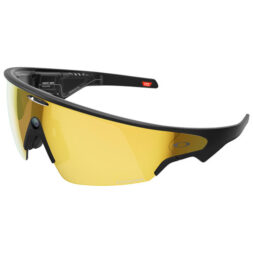
For users who spend significant time active outdoors, the Vanguard design may offer a better fit and stability during motion. Think of cycling, running, hiking, climbing, outdoor training, or anything particularly adventurous. You could just as easily wear them in lower-intensity outdoor activities, like baseball, golf, and fishing, as well, so there are no hard and fast rules on when and where to wear them.
Oakley Meta HSTN
The HSTN (pronounced “HOW-stuhn”) take a more lifestyle-focused approach with Oakley’s round-frame design blending sporty styling with everyday wearability. These are arguably closer to Ray-Ban Meta glasses than Vanguards because of that balance between fashion, comfort, and smart functionality, but there is no doubt active lifestyles are part of the focus here.
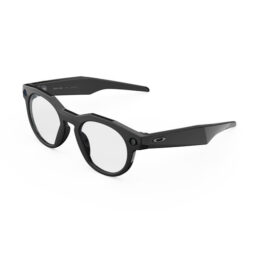
In that regard, the HSTN are smart glasses that can transition from outdoor activities to everyday use. You can wear them on a daily basis, just hanging out, during travel, or walking and commuting. They’re perfectly fine during fitness activity outdoors, and are clearly made for creating content through the built-in camera, too.
They just aren’t as rugged. Their IPX4 rating is nowhere near the IP67 dust and water resistance the Vanguards offer. If you’re thinking of anything involving lots of splashing water or snow, the HSTN aren’t ideal for that.
How to use Oakley Meta AI Glasses
How Meta AI voice commands work
Meta AI acts as the control centre for the glasses. Instead of reaching for touch controls or your phone, say, “Hey Meta” to wake the assistant and try commands like:
- “Hey Meta, take a photo,” captures an image immediately
- “Hey Meta, record a video,” starts recording, while “Hey Meta, stop recording” ends it
- “Hey Meta, what am I looking at?” uses the camera to identify objects, landmarks, or text in your field of view
- “Hey Meta, call (contact name),” initiates a hands-free call
- “Hey Meta, translate this,” reads and translates text or spoken language in front of you
- “Hey Meta, what’s the weather?” pulls real-time information
You don’t have to limit yourself to canned questions or commands, either. Ask Meta AI more open questions like you would another voice assistant and learn something new or strike up a conversation. As of now, however, Meta’s AI assistant still doesn’t have the knowledge depth or detail the likes of Gemini, ChatGPT, Claude, and others currently have.
To understand the full capabilities of the camera and AI processing behind these commands, read Oakley Meta AI Glasses: camera, video, and AI features you should know.
Taking photos and videos
The built-in camera isn’t a one-trick pony in the sense that it can do more than just take a photo or record a video clip. It also lets you gain contextual information through Meta AI and capture moments from your own perspective without needing to pull out a smartphone.
For instance, if you say, “Hey Meta, take a photo,” it will do just that. The same goes for video. One important difference between the two Oakley models is camera placement. The Oakley Meta Vanguard positions its camera in the nose bridge, creating a more centred, eye-level perspective. The Oakley Meta HSTN places its camera on the side of the frame, similar to the Ray-Ban Meta glasses.
It’s especially useful to go hands-free for activities where your hands are occupied. That can be a wide range of situations as varied as cycling on trails, skiing, ziplining, hiking a scenic route, climbing, or recording family or travel moments. You can always use the Meta AI voice command to start/stop a video or just capture a still photo.
When you do have your hands free, you can press and hold the capture button for two seconds to start recording a video. By default, your AI glasses record clips for up to 30 seconds, but you can change this setting in the app. With the Meta AI mobile app, you can extend this to 3 minutes for most devices, or up to 5 minutes with Oakley Meta Vanguard. The camera moves as your head and face move, so a good practice is to try to move smoothly and in a more deliberate way to give that first-person footage less shaky or jerky movements. There’s no optical stabilization here to offset that.
Photos and videos can automatically sync to the Meta AI app on your smartphone, making it easy to edit and share content afterward.
Knowing what you’re looking at
One of the most useful features is the ability for Meta AI to understand what you’re looking at through the built-in camera. For example, while hiking you can ask, “Hey Meta, what mountain is that?” While travelling, you might say something like, “Hey Meta, translate this sign.”
This combination of voice interaction and visual understanding helps make the glasses feel more useful in real-world situations than traditional voice assistants. Like other Meta AI features, this requires a connected phone for cloud processing. It can be in your pocket—it just needs to be within range of the glasses and have either data or Wi-Fi to get the job done.
Viewing and sharing photos and videos
When you capture photos and videos with your Oakley Meta glasses, they will automatically sync to the Meta AI app once you place them in their charging case. From there, you can review, edit, and save your content directly to your smartphone. The app also makes it easy to share photos and videos to Instagram and Facebook. As a creator, you can livestream with the glasses hands-free, giving followers a chance to truly see everything through your perspective.
Listening to music, taking calls, and using Meta AI
Oakley Meta glasses feature built-in open-ear speakers that let you listen to music, podcasts, directions, and Meta AI responses without blocking out the world around you. Keep in mind that the audio experience won’t match or replace a dedicated pair of earbuds or headphones. You’re getting the convenience of everyday listening and staying connected while on the move. The built-in microphone array helps pick up your voice for calls and voice commands, while touch controls and voice commands make it easy to adjust volume, skip tracks, answer calls, or interact with Meta AI without reaching for your phone.
Battery life and charging
Battery life varies depending on how frequently you use things like video recording, voice commands, AI features, phone calls, and streaming music. You’re probably looking at a 4- or 5-hour duration with mixed usage, maybe about 6 hours depending on how much video you’re recording. The HSTN typically fall about an hour less in these rough metrics compared to the Vanguard, owing to their smaller frame.
One rule of thumb to squeeze more out of the battery is by reducing live streaming, which is maybe the biggest drainer of all. Other tips, like lower volume and disabling Wi-Fi, also help when you don’t need them. The Meta AI app shows real-time battery percentage for both glasses and case. Plus, the charging case effectively acts as a portable battery bank, like earbuds, helping extend usage during travel and long outdoor activities.
Maintenance and care tips
Cleaning the lenses
Given their outdoors-y focus, there’s a higher chance Oakley Meta glasses get dirtier than Ray-Ban Metas do. Be careful in how you clean the lenses and frames, using only a microfibre cloth with a proper liquid lens cleaner. Just apply it to the cloth, not the lens. Nothing made of paper products or any other types of fabric. Avoid household cleaners, too, because they may be too rough and abrasive for the lens coatings.
Storing your glasses
The charging case is great for storage. While you might leave a pair of regular Oakleys lying around, try not to do that with either the Vanguard or HSTN. They have batteries and electronic components inside, so excessive heat, liquid spills, and accidental bumps could damage them in some way. The Vanguard have solid dust and water resistance but that’s not necessarily an open invitation to take them swimming. They’re not made for that.
They’re not intended for swimming or prolonged water exposure. The HSTN have no real protection against those things, so you have to be extra careful with them.
Software updates
The Meta AI app will pop up a notification when new firmware is available. It also never hurts to check once in a while and see if the app has something. All you have to do to initiate the update is place the glasses in the case with Wi-Fi on and let it install.
Troubleshooting common issues
Glasses not connecting
Troubleshooting options largely mirror those of the Ray-Ban Meta glasses. If Bluetooth is wonky, try toggling Bluetooth on and off on your connected phone first. Open the charging case to re-trigger pairing mode. If that fails, force-quit the Meta AI app and reopen it. As a last resort, forget the device in Bluetooth settings and pair from scratch.
Camera not working
Check app permissions first by going to Settings -> Apps -> Meta AI (this sequence may differ slightly depending on your phone) and confirm camera and microphone access are enabled. If permissions are correct, place the glasses in the case for 10 seconds, then reopen to restart them.
Poor audio quality
The first thing to check is whether the glasses somehow dislodged from their natural fit. That could happen during activity. Adjust the nose pads and temple angle so the frame sits close to your ears. Audio quality will drop in windy conditions since there’s no passive isolation with your ears. If call quality is continually muffled for the other party, confirm microphone permissions are active.
Who should buy Oakley Meta AI Glasses?
These glasses make the most sense for people who already spend a lot of time outdoors. You don’t have to always be active to wear them, particularly when it comes to the HSTN pair, but it should be some part of your lifestyle to get more out of these Oakley smart glasses.
Athletes
This could really be almost any type of athlete engaged in activity on land. Maybe even skydivers, though goggles are generally the better route there. Cyclists, runners, golfers, and hikers can benefit from hands-free communication, audio, and content capture.
Content creators
The first-person camera perspective creates engaging footage that would otherwise require a separate action camera. The Oakley Meta Vanguard’s nose-bridge camera offers a centred, eye-level perspective, while the HSTN captures content from a side-mounted camera similar to the Ray-Ban Meta glasses. Both provide a natural first-person point of view that’s well suited to capturing activities hands-free.
Travellers
Neither the Vanguard or HSTN will necessarily replace your phone or standalone camera for quality during your travels but they do win out on convenience. With translation tools, navigation assistance, and hands-free imaging available, you can capture content in ways that are more laborious with the other options.
Tech enthusiasts
If you just like tech, it’s easy to be interested in Oakley Meta glasses as the latest wearable AI technology that works in a practical way.
Check out the full Oakley Meta lineup available at Best Buy now.