
Brad Moon

Convertible laptops
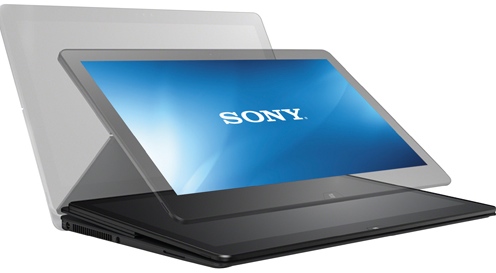
When it comes to cars, a convertible is one with a roof that protects occupants from the weather while offering a top-free ride in the summer sunshine. When it comes to PCs, convertible laptops mean something a little different. These are PCs that combine the best of two different experiences —the laptop and the tablet— in a single device. And like a convertible (the car), a convertible laptop accomplishes this trick through some clever hardware design. Convertible laptops aren’t for everyone, but if you’re a fan of mobile computing and you’d love to have a tablet along for the ride without the extra weight (and expense); or if you wish your tablet had a keyboard and trackpad, a convertible laptop may be the ideal device for you.
How to create your own ringtones in iTunes in 6 easy steps
Samsung Galaxy NotePro vs. Galaxy TabPro: which one’s right for you?
At this year’s Consumer Electronics Show, Samsung unveiled new Pro series tablets: the Galaxy NotePro and Galaxy TabPro. All four tablets share a number of common features like a high resolution (WQXGA) 2560 x 1600 pixel TFT LCD display, 8 megapixel rear camera, and Android 4.4 (KitKat). So which of these tablets is the right one for you, the Galaxy NotePro or the Galaxy TabPro? Here’s a breakdown of some of the key differences between the two and the target market for each.
A Kobo Arc for all your reading needs
When it comes to e-readers and tablets, Kobo has grown from an underdog competing against the Kindle to a leading manufacturer that also happens to operate a top notch e-bookstore. The current line-up of Kobo Arc tablets is particularly attractive, offering performance, brilliant high resolution displays, full access to Android apps and combined this with Kobo’s e-book expertise. Kobo has positioned the Arc line as the best tablet choice for readers. But which Kobo Arc is the right choice for you? In this post, I explore the differences between the Kobo Arc 7HD, Kobo Arc 10HD and the Kobo Arc 7.
When and why to upgrade your video card
One of the cool things about PCs is that nothing ever stands still. Whether it’s new video games that redefine immersion, or the ability to edit photos at full resolution with a 4K monitor, progress often means pushing the limits of a video card. If you’ve hit a wall when it comes to your computer’s graphics capabilities, or maybe you made a New Year’s resolution to upgrade your PC so you can use that big 4K monitor to full advantage, the good news is this doesn’t need to mean shelling out for an all new system. Chances are you can get back to enjoying the best PC technology has to offer by simply upgrading your video card.
Western Digital My Cloud Review: The Best Thing to Happen to External Hard Drives Since USB

Many of us have more data than we know what to do with. Digital photos, digital movies, MP3s and old school stuff like documents and spreadsheets can start to take up a lot of space on your PC. On your smartphone or tablet, it’s even worse —a lot of those photos get snapped on a smartphone and with limited storage, it doesn’t take long to fill them up. Cloud storage is always an option, but then you’re at the mercy of the provider and there may be charges associated with the service. Western Digital offers a compelling alternative —a “personal cloud”— with its My Cloud series of network hard drives. I tested a 3TB My Cloud drive and came away convinced that this is the best thing to happen to hard drives since USB.
Review: Sony Vaio Fit 15A Multi Flip PC

Sony’s Vaio series of PC laptops has always won points for style and design and the company has become a leader in producing Windows 8 hybrid machines —portables that combine Windows 8 PC and tablet capabilities. I’ve spent the past week trying out Sony’s latest take on the hybrid form factor. After putting it through its paces, I can assure you that the Vaio Fit 15A is one of the most useful variations yet on the tablet/notebook convertible hybrid, a real looker (especially in the black finish of the test unit) and an able performer. It’s held back a little by a few details —a loud and persistent fan, so-so keyboard, and not so stellar battery life among them— but offers a solid portable computer experience, along with tablet capability, in a single package that just happens to look pretty smashing.