Give a laptop if the person will study, work, or create on it. Give a tablet if they’ll mostly watch, read, sketch, or browse. Give a 2-in-1 if they’ll do a bit of everything. That’s the short answer to the laptop or tablet gift question, and it holds for a birthday, a graduation, a new job, or the holidays.
The longer answer has shifted recently because of AI. Many new laptops, and a growing number of tablets, now include chips built to run AI features on the device itself, such as live captions, writing help, and photo cleanup. It’s a useful bonus, but it shouldn’t decide the gift. This guide covers who each device suits, where AI fits in, and what to check before you buy. You can browse laptops at Best Buy Canada and tablets and iPad at Best Buy Canada as you read.

In this guide
- When is a laptop the better gift?
- When is a tablet the perfect choice?
- 2-in-1 devices: the best of both worlds
- Are AI laptops and tablets worth giving?
- Buying tips for gifting a laptop or tablet
- Wrap up something they’ll truly use

When is a laptop the better gift?

If the person you’re buying for needs to dive into serious tasks, whether it’s studying, running a small business, editing videos, coding, or gaming, a laptop is likely the smarter choice. Unlike tablets, most laptops run full desktop operating systems (like Windows or macOS), giving users access to powerful tools, full-scale applications, and better file management. They’re designed for multitasking and high performance, perfect for productivity-focused or tech-savvy users.
Laptops come in many shapes and sizes from slim ultrabooks and rugged business models to high-performance gaming machines. They’re also a strong investment as a well-chosen laptop can last years, evolve with the user’s needs, and even double as a desktop replacement when docked at a workstation. Not sure whether a Chromebook or a budget Windows laptop is the better gift? This guide can help you compare the two: Chromebooks vs. budget Windows laptops.
A laptop is ideal for
- Students: Those balancing note-taking, research, video calls, and entertainment.
- Professionals and entrepreneurs: For emails, presentations, remote meetings, and managing files or finances.
- Creatives: Artists, designers, photographers, and video editors who need graphics performance and colour-accurate displays.
- Gamers: For smooth performance in fast-paced or graphically demanding games.
Why choose a laptop
- Larger screens make it easier to work on documents, spreadsheets, or visual projects without feeling cramped.
- Physical keyboards are better for typing essays, reports, or long emails.
- Faster processors and more RAM handle heavier workloads and complex applications.
- Full file system access makes saving, organizing, and backing up work easier than on mobile operating systems.
- Ports and expandability: USB-A, HDMI, SD card slots, and Thunderbolt ports allow users to connect to a range of accessories or external displays.
- Upgradability (on some models): RAM or storage upgrades can extend the laptop’s lifespan.
Extra considerations when gifting a laptop
- Battery life: Many thin-and-light laptops now last a full day away from the charger. Apple rates the MacBook Air with M5 at up to 18 hours, and independent streaming tests of recent AI laptops have landed at roughly 13 to 17 hours. That suits students or travellers who move between classes, cafes, or meetings, though manufacturer figures are a best case.
- Build quality and design: Some recipients may prioritize aesthetics (sleek, light, minimalist designs) or durability (metal chassis, spill-resistant keyboards).
- Operating system: Choose based on the recipient’s comfort; Windows offers wide flexibility and game support, macOS excels in creative workflows, and ChromeOS (for Chromebooks) is ideal for light, browser-based use.
- Webcam quality: A bonus for professionals and students who attend frequent virtual meetings or classes. Look for 1080p webcams with noise-reducing mics for better clarity.
Great laptop accessories
- Laptop sleeve or backpack: For safe and easy transport, some even have anti-theft designs or USB charging ports built-in.
- Wireless mouse: Adds precision and comfort, especially for office tasks or gaming.
- Cooling stand or docking station: Enhances airflow, ergonomics, and port expandability at home or the office.
- Microsoft 365 subscription: Perfect for school or work, includes Word, Excel, PowerPoint, and 1TB of OneDrive storage.
- Noise-cancelling headphones: A thoughtful add-on for focused study sessions or virtual meetings.
- External monitor: Great for dual-screen setups at home, ideal for professionals or creators needing more screen real estate.
When is a tablet the perfect choice?

If the person you’re shopping for loves watching movies, reading eBooks, browsing social media, or sketching on the couch or while travelling, a tablet might be the best fit. Tablets are slim, ultra-portable, and super intuitive ideal for light day-to-day use and entertainment. They power on instantly, offer long battery life, and are a hit with both kids and adults who don’t want the complexity of a full computer. Need help narrowing down tablet options? Explore this roundup of the best tablets for every budget and need.
Tablets are also great for people who don’t need a keyboard all the time. With optional accessories like styluses or Bluetooth keyboards, they can still be productive but on the user’s terms. And thanks to their touch-based interfaces and curated app stores, tablets feel natural even to people who aren’t “techy.”
A tablet is deal for
- Kids and teens: For learning apps, drawing, and safe screen time.
- Readers and travellers: For lightweight, distraction-free reading or binge-watching shows on the go.
- Artists and hobbyists: For digital drawing, sketching, or handwriting.
- Casual users: For browsing the web, checking email, and staying in touch with family via video calls.
Why choose a tablet
- Ultra-light and compact: Easy to hold with one hand or slip into a small bag.
- Instant-on experience: Power up and start browsing or watching within seconds.
- Intuitive interface: Touchscreen navigation makes it accessible for users of all ages.
- Great battery life: Many models last 10–12+ hours of active use, perfect for travel or long reading sessions.
- Digital creativity: With a stylus, many tablets double as sketchbooks or note-taking tools.
- Family-friendly features: Parental controls and kid modes help create a safer experience for young users.
Extra considerations when gifting a tablet
- App ecosystem: iPad models have access to a vast and polished library of apps, especially creative and productivity ones. Android tablets offer more flexibility and options for customization.
- Storage needs: Look for 128GB or more, or expandable storage (via microSD card) if the user downloads lots of media.
- Display quality: If your recipient watches a lot of videos or reads in bed, consider tablets with higher resolution and blue light filtering for eye comfort.
- Stylus support: Ideal for note-takers or doodlers. Some tablets include a stylus (like Samsung’s S Pen); others (like iPad) require a separate purchase.
Great tablet accessories
- Protective folio or case: For drop protection and hands-free viewing.
- Stylus or digital pen: For drawing, taking notes, or more precise touch control.
- Screen protector: Prevents scratches and smudges, especially useful for younger users.
- Bluetooth keyboard: Transforms the tablet into a mini workstation when needed.
- Portable power bank: A thoughtful addition for travellers or commuters.
2-in-1 devices: the best of both worlds
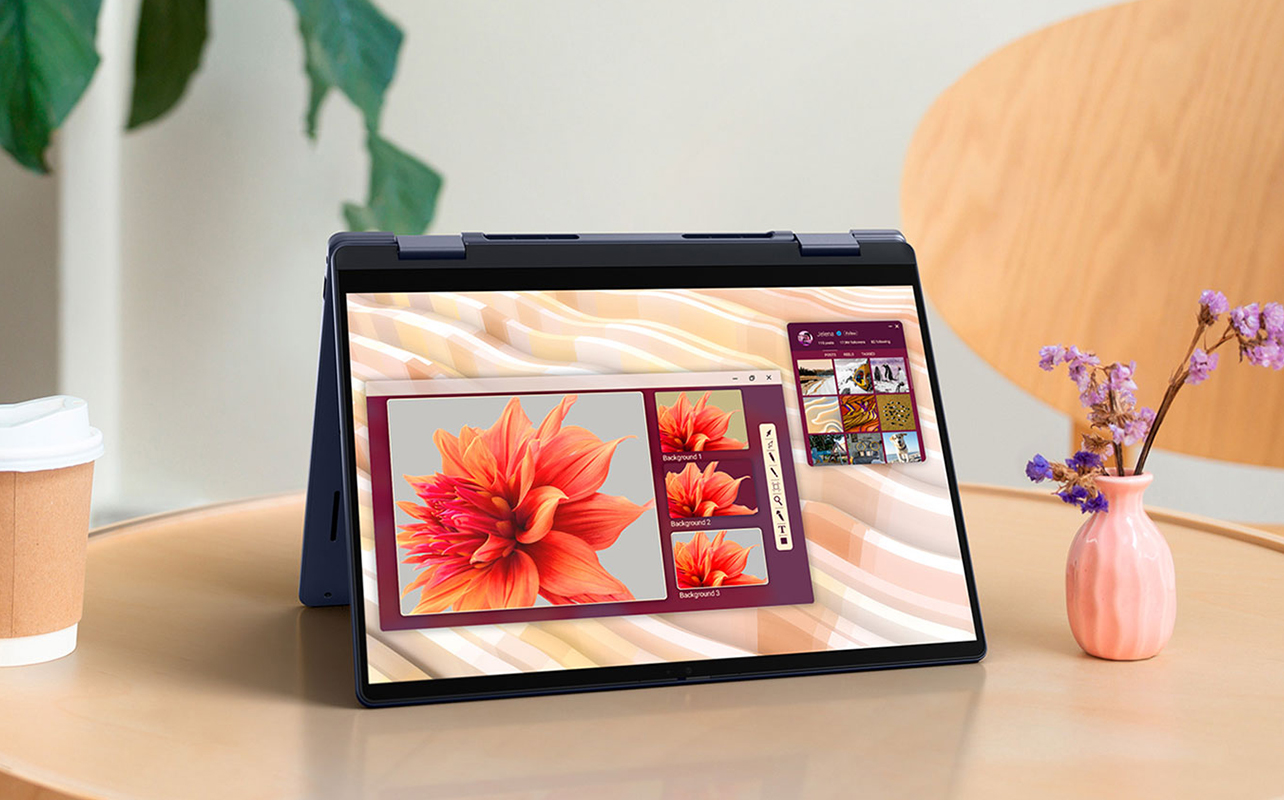
If your recipient is someone who likes flexibility or does a little bit of everything, a 2-in-1 device can be the ultimate tech gift. These hybrids combine the strengths of a laptop (keyboard, full OS, productivity) with the ease and portability of a tablet. You can fold, flip, or detach the screen to suit different situations from writing an essay to streaming a movie in bed.
2-in-1s are ideal for people who want a do-it-all device without having to carry both a laptop and a tablet. They’re popular among students, remote workers, artists, and anyone who values mobility without sacrificing function.
A 3-in-1 device is ideal for
- University and college students: For taking handwritten notes in class and typing papers at night.
- Remote and hybrid workers: For switching between Zoom calls, spreadsheets, and tablet-based tasks.
- Digital artists or hobbyists: For drawing with a stylus or annotating documents.
- Tech-savvy users: For those who love multi-mode functionality and portable productivity.
Why choose a 2-in-1
- Flexible form factor: Use it like a laptop when you need to type; flip or detach to use as a tablet.
- Touchscreen and stylus support: Great for drawing, signing documents, or quick navigation.
- Runs full desktop operating systems: Most 2-in-1s run Windows, so you can install all your favourite apps and software.
- Perfect for note-taking: Use a stylus to jot down lecture notes, sketch ideas, or highlight PDFs.
- Space-saving and travel-friendly: Combines two devices into one, reducing clutter and weight.
Extra considerations when gifting a 2-in-1
- Weight and portability: Convertible laptops may weigh a bit more due to the keyboard and hinge. Detachables like the Surface Pro are lighter but may need accessories for full laptop functionality.
- Stylus inclusion: Some models include an active pen; others (like the Surface Pen) must be purchased separately.
- Battery life: Detachables usually offer longer battery life, while convertibles with powerful processors may need charging sooner under heavy use.
- Software needs: A 2-in-1 is ideal if your recipient wants to use full programs like Word, Photoshop, or AutoCAD on the go.
Great 2-in-1 accessories
- Detachable keyboard or type cover: A must-have if the model doesn’t include one by default.
- Active stylus: Unlocks creative and handwriting features.
- Protective sleeve or case: Especially important for detachables, which are often thinner and more vulnerable.
- Tablet stand or lap desk: For comfortable use in different environments.
- USB-C hub: Expands ports so they can connect external monitors, USB drives, or other peripherals.
Are AI laptops and tablets worth giving?
Yes, as a bonus, not as a reason to overspend. AI features are useful and becoming standard, but the person should still choose the device based on how they live.
What is an AI laptop?
An AI laptop has a section of its chip called an NPU (neural processing unit), built to run AI tasks such as live captions, video-call effects, and smarter file search. Doing that work on the device is meant to be quicker and easier on the battery. NPU speed is rated in TOPS, short for trillions of operations per second. On the Windows side, the clearest shopping signal is the Copilot+ PC label, which requires an NPU rated at 40 TOPS or more, at least 16GB of RAM, and at least 256GB of storage.
Which devices have AI features?
- Windows: Select laptops with Snapdragon X2, many Intel Core Ultra Series 3, or AMD Ryzen AI 400 chips are built to qualify, as is the Snapdragon version of the Surface Pro. Not every Core Ultra or Ryzen laptop does, so look for the Copilot+ PC label on the product page. Snapdragon laptops use a different chip design (ARM), so confirm the recipient’s key apps and accessories are supported.
- Apple: Apple Intelligence runs on iPad Pro and iPad Air with M1 or newer, iPad mini (A17 Pro), and MacBook models including the MacBook Air and MacBook Neo. The standard iPad (A16) isn’t on Apple’s list.
- Samsung and Google: Galaxy Tab S models include Galaxy AI and Gemini, and Chromebook Plus models add Google AI tools, though features vary by region.
Should AI decide the gift?
No. Pick the device type by how the person lives, then choose an AI-capable model when the price is close. It helps most for students, professionals on frequent video calls, and creatives, and matters least for kids’ tablets or anyone who mainly streams. Today’s Copilot+ features, like Live Captions that translate speech, Windows Studio Effects, and file search by description, are handy rather than life-changing. Microsoft is also bringing AI tools to other Windows 11 PCs, so don’t pay a premium for a bigger NPU alone.
Still unsure? Here’s a quick side-by-side comparison

If you’re still torn between gifting a laptop or a tablet, this quick comparison table will help clarify which device best suits your recipient’s lifestyle and needs. From portability to productivity, here’s how they stack up:
| Feature / Need | Laptop | Tablet |
| Portability | Moderate (varies by size) | Excellent (lightweight and compact) |
| Productivity power | High (great for multitasking and software) | Medium (suitable for light tasks) |
| Entertainment / media | Good (especially on higher-end models) | Excellent (ideal for streaming & reading) |
| Note-taking / drawing | Limited (needs accessories) | Excellent (especially with stylus) |
| Battery life | Moderate to long (the newest thin-and-light models last a full day) | Long (often 10–14+ hours) |
| AI features | Widest on Copilot+ PCs and recent MacBook | Apple Intelligence on supported iPad; Galaxy AI on Galaxy Tab S |
| Best for gifting to | Students, professionals, creators, gamers | Kids, travellers, readers, casual users |
Buying tips for gifting a laptop or tablet
Still deciding between a laptop or tablet? These quick tips can help make your gift smarter and more complete:
- Match it to their lifestyle: Consider how the person will use the device, whether it’s for school, remote work, creativity, travel, or everyday browsing.
- Set a budget and look for bundles: From affordable tablets to premium laptops, there are solid options across every price range. Bundles, especially around big sales events, often include accessories or subscriptions, offering great value.
- Complete the setup: Add thoughtful extras like a protective case, wireless mouse, Bluetooth keyboard, or a stylus to make the gift even more useful from day one.
- Protect your purchase: Consider adding an eligible Best Buy Protection plan with coverage against accidental damage, battery wear, and screen issues. You can also get expert setup, support, and repairs through Geek Squad services.
What should you avoid buying?
A good deal isn’t a good gift if the specs fall short. Here are my recommendations as to what to avoid:
- Windows laptops with 8GB of RAM or less. Many laptop memory is soldered and can’t be upgraded later, and rising memory costs may push some makers toward 8GB entry models, so check the spec. 8GB can work on a Chromebook or MacBook Neo for browsing, writing, and streaming.
- Laptops with under 256GB of storage, or tablets with 32GB. They fill up fast.
- Older dual-core processors. They feel slow within a year or two.
- Devices without USB-C charging, or with outdated ports. Check that the charging connection and ports suit the recipient’s existing accessories.
Wrap up something they’ll truly use
Gifting tech isn’t just about specs and screens it’s about choosing something that will slip seamlessly into someone’s life and make it better. Whether it’s a laptop built for late-night study sessions, a tablet for drawing on the go, or a 2-in-1 that does both without missing a beat, the right device feels less like a gadget and more like a companion.
And the best part? You don’t have to guess. By matching the gift to how they live, work, learn, or unwind, you’ll end up with something they’ll not only love but actually use. Explore Best Buy Canada’s latest laptops, tablets, 2-in-1s, and curated bundles to find a gift that balances joy and practicality.

Frequently asked questions
For light work, yes. An iPad Pro with Magic Keyboard or a Galaxy Tab S with DeX (Samsung’s desktop-style mode) handles email, documents, and note-taking. For coding, video editing, or heavy multitasking, stick with a laptop.
For high school, a Chromebook Plus, an entry-level Copilot+ Windows laptop, or an iPad Neo Or iPad Air. For university, a thin-and-light AI laptop, a Surface Pro, or a MacBook Air.
A tablet for younger children, since it’s simple and has parental controls. A laptop once schoolwork turns to typing and research.
A compact tablet if they’re mostly reading and streaming, or an ultraportable laptop or 2-in-1 if they need to work.