
When it comes to sunglasses, Oakley has always been known for being active outside. The Oakley Meta line—the HSTN and the Vanguard—follows in the footsteps of the Ray-Ban Meta AI smart glasses in that they share the same core tech, only you get the athletic Oakley aesthetic to go with it.
If you’re a cyclist, runner, or outdoor athlete looking for a hands-free way to document your active lifestyle, the Vanguard should provide that sporty fit for just such a need. On the other hand, the HSTN (pronounced “Houston”) are more about fitting in with daily life through more low-profile lifestyle frames, including with prescription options.
They’re compelling because they work in combining Oakley build quality with smart features like a camera and AI assistant. Should these be your next—or first—pair of smart glasses? Let’s dive in deeper and find out.

Table of contents
- Pros and Cons of Oakley Meta AI Glasses
- What are Oakley Meta AI glasses?
- Design, comfort, and build quality
- Key features explained
- Real-world usability
- Privacy concerns and ethical questions
- Oakley Meta AI Glasses vs. alternatives
- Final verdict
Pros and Cons
Pros:
- Totally hands-free capture: no mounts, no reaching for a phone, footage from your own eye level
- Strong audio for an open-ear design, with wind handling that holds up at basic cycling speeds
- Genuine Oakley build and lens quality, plus the Garmin data-overlay integration
Cons:
- Some users may have questions around privacy
- A Meta account is a must to use these glasses—no exceptions.
- Not a full phone or action cam replacement in that you won’t have the same aspect ratio, resolution options, and dedicated tools they have
What are Oakley Meta AI Glasses?
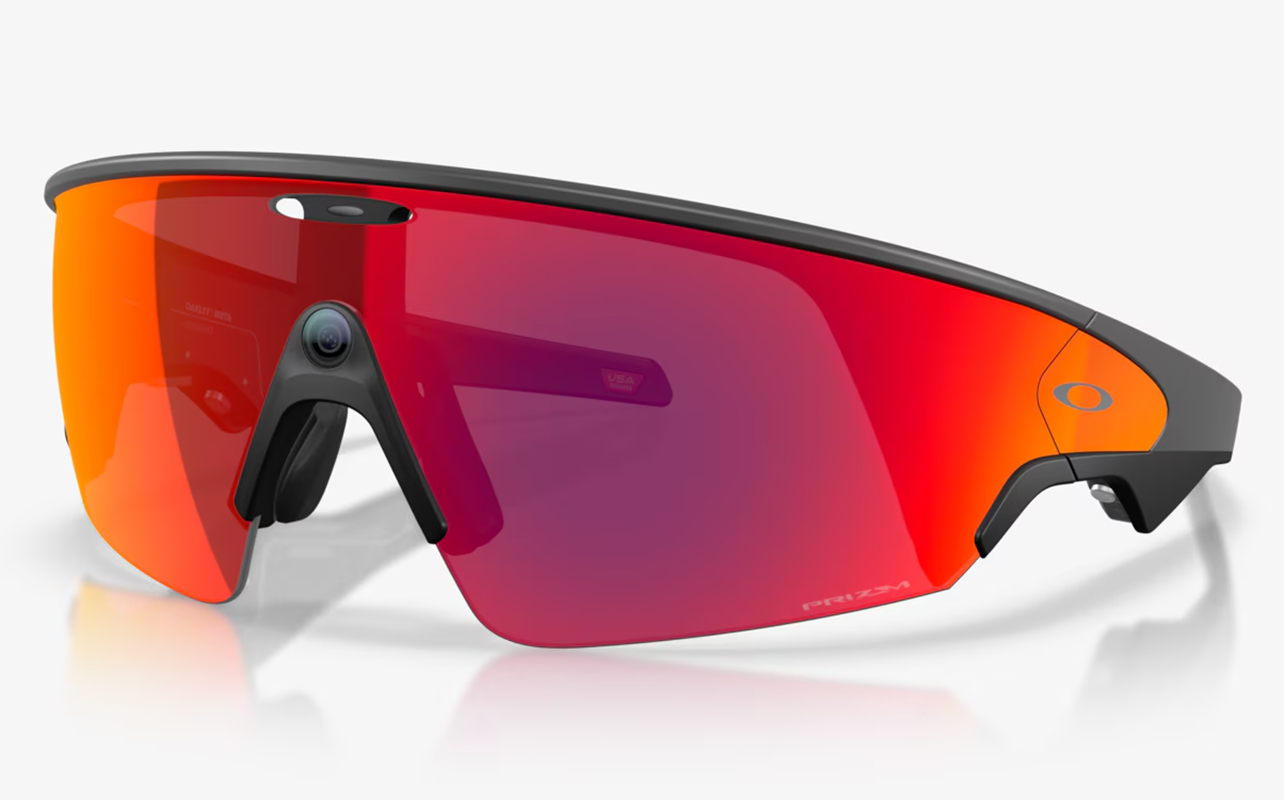
These smart glasses are borne out of a partnership between Meta and Oakley. The HSTN came first when they launched in June 2025 as more of a lifestyle play, kind of like sleeker Oakley frames with built-in camera, open-ear speakers, and Meta AI. The Vanguard followed in October 2025, only with a clearer focus on athletes, courtesy of the Oakley wraparound frames, complete with a centred nose-bridge camera, 122-degree field of view, IP67 water resistance, five-microphone wind reduction, and Garmin integration.
Like the Ray-Ban Meta glasses, both of them run on Qualcomm’s Snapdragon AR1 platform. That also includes a 12-megapixel camera on the Vanguard capable of recording video up to 3K at 30fps, except you get a wider 122-degree field of view versus the HSTN’s 100 degrees. With the camera situated at the centre on the nose bridge instead of the edge of the frame, you arguably get a better viewpoint for footage and photos, especially when placing your hands on the frames.
The biggest difference with the Ray-Ban Meta glasses is simply that the latter skew toward everyday life, whereas Oakley Meta Vanguard glasses skew active, with better camera specs and water resistance. The HSTN are unique in this mix because they are actually a little bit of both put together.
Design, comfort, and build quality

Frame and Lenses
You have to consider Oakley’s design pedigree as a key reason to choose wearing a pair over other Meta smart glasses. They’re built to feel like Oakley glasses; it’s just that they happen to contain tech underneath. The HSTN take a more modified approach by leaning more lifestyle, as evidenced by their relatively conventional look and prescription lens availability. The Vanguard don’t do that. They’re more like reimagined Oakley Sphaera glasses, the ones with a visor-style shield cyclists and runners know for many years.
Both use Prizm lens technology, Oakley’s optical system that increases contrast and is tuned for specific conditions (Prizm Road for surface detail, Prizm Black for versatility in bright light). You can get replacement lenses separately but bear in mind clear lens options aren’t yet available for the Vanguard.
Wearing the HSTN in public won’t really lead to curious glances. They fit in pretty well in most places and cases. The Vanguard don’t since they look like pure athletic gear.
Fit, weight, and all-day wear
Vanguard glasses weigh about 66g, more than double the weight of conventional performance glasses. The HSTN come in at roughly 53g. You’ll notice the heft but you may also catch on to how it’s pretty evenly distributed for the sake of comfort. Oakley includes three interchangeable nose pieces for different bridge shapes in the Vanguard box.
It also helps that the Vanguard can fit nicely with a variety of helmets. That’s why you’ll find the buttons placed underneath the temples for better access. It’s just hard to know exactly how they’ll fit given the broad range of helmets out there, so while they may be perfectly fine under a typical cycling or baseball batting helmet, MTB or skiing/snowboarding helmets might prove tricky depending on their design.
In contrast to all that, the HSTN and their slimmer profile can feel snug on a variety of faces and can do just fine under many different types of helmets. They’re just not as durable with only IPX4 water resistance.
Key features explained
Camera and video capture
The onboard camera is definitely a key feature. Both models shoot 12-megapixel photos and up to 3K/30fps video, but the Vanguard’s centred, wider-angle placement produces footage much closer to true first-person view than the HSTN’s corner-mounted, 100-degree setup. You really notice the difference when your hands are integral to the shots you’re creating.
The built-in camera is adept at producing footage for social and lifestyle content. Stabilization holds up impressively on bikes and runs, going smooth on the bike and surprisingly steady while running. You could theoretically get away with recording a marathon wearing a pair of these.
Quality won’t quite match the potency of an action cam, nor necessarily the best smartphone video cameras available. The Vanguard can’t match a GoPro or phone’s range of resolutions, frame rates, and focal lengths, for instance. When you record anything with these glasses, you set it in motion, either via a double-tap, voice command, or the Vanguard’s programmable button.
Audio, speakers, and calls
Open-ear audio is nice if you’d rather keep your ears open. The Vanguard glasses have louder speakers than the HSTN’s, making them Meta’s most powerful yet. A five-microphone array (in both temples and the nose area) is optimized to reduce wind noise during calls, messaging, and voice commands.
Calls will hold up well at walking or jogging pace, whereas high cycling speeds make it tougher to carry a clear conversation in the face of all the wind noise. They can affect music and podcasts across most riding conditions short of very high speed, though you’ll also notice clarity bump up when you’re not at top speed.
Meta AI Voice Assistant
A simple, “Hey Meta,” handles media, calls, messages, navigation, and general questions. Each subsequent software update makes Meta AI more effective, accurate, and faster in responding to what you say to it. The Meta AI app actually has a way to assign a custom AI prompt to the Vanguard’s programmable button, meaning you can use it as a shortcut to get a read on pace or heart rate mid-run without saying a word.
We’re still in early days for this sort of thing, so measure your expectations. The AI is largely reactive by responding to inputs rather than proactively suggesting things as you move or do something. Sports coaching isn’t in the repertoire here, for instance. But you can still use Meta AI to ask about sports or whatever else you want to know.
Real-world usability

Everyday life
The HSTN lives more naturally outside of a sporting context, where it can blend in more seamlessly into daily life for music, calls, and casual photos. The Vanguard’s athletic look is more likely to turn heads, though the recording LED light is perhaps small enough that most bystanders won’t register it.
Sports and active use
This is the big draw, especially for the Vanguard. For cyclists, it really comes off as a solid alternative to wearing chest mounts, helmet cams, and handlebar mounts to capture what’s ahead. With the glasses just sitting where your eyes are, you have a more natural way to get this done. Saying, “Hey Meta, take a photo,” tells the glasses exactly what to do, so you don’t reach for a phone or slow down to fiddle with placement. Oakley also feels the wraparound design blocks wind better than traditional running frames while integrating cleanly with helmets.
If you’re also wearing a compatible Garmin device or tracker, there are Garmin integration overlays for heart rate, pace, distance, and speed onto footage you capture during a tracked activity. This happens in real time, thereby turning casual clips into shareable training content without any real setup.
Setup, app, and learning curve
The Meta AI app is central to how the Vanguard and HSTN work because they handle setup, updates, and media management. You need both the Meta AI app and a Meta account to get the ball rolling to begin with. The app simply can’t work without the account. Both are free, so there’s no need to subscribe to anything.
Over time, the nuances involved start to shape out. Since you can livestream from the glasses (via your phone for the internet connection), Wi-Fi makes the data transfer feel clean and smooth, albeit with slower sync times for larger files. It might take a week or two to learn all the touch controls and voice commands to feel natural.
Privacy concerns and ethical questions
Do they record all the time?
No. The glasses don’t continuously record photos, videos, or audio. They only start recording when you intentionally take a photo, record a video, or use a supported voice command. Like other voice assistants, the microphones listen for the wake word (such as “Hey Meta”) so they can respond to commands, but they don’t continuously save or record conversations. Whenever the glasses are actively capturing a photo or video, the built-in LED privacy light illuminates to signal that recording is taking place.
Signal a recording
The LED is there to specifically tell nearby people they’re being filmed if they’re within view. Covering it up also automatically stops recording. Some critics argue the small LED isn’t obvious enough as a way to notify bystanders who don’t understand what the light means.
Meta, data, and trust
A Meta account is mandatory—there’s no way to use these glasses without one. Neither Canada nor the United States have a glasses-specific privacy law, though there is some litigation around Meta using user footage to help train its AI. Check your auto-upload and AI-training settings right after setup and don’t assume they’re off by default.
Using them responsibly
Review the app’s privacy and auto-upload settings immediately, and use the Sensitive Places feature where available. Avoid recording in healthcare settings, changing rooms, private gatherings, or anywhere consent expectations are high. The simplest way to look at this is if it’s inappropriate to pull out a phone to film, then it’s safe to say using the glasses to do the same is arguably more so, particularly since the camera is harder to notice.
Battery life and charging
Meta claims the Vanguard can go up to nine hours of general use or about six hours of continuous music playback, with the charging case adding roughly 36 hours. A 20-minute quick charge reaches 50%. Bet on more like six hours per charge with mixed music, photo, and video use, which should last you for a while but not enough for a weekend without charging up again. That’s especially true when it comes to heavier video capture as it drains the battery faster.
Lighter video use should get you through a 4-5 hour stretch. You need the case to charge them up again anyway given there’s no USB-C port on the glasses themselves. Versus a DJI action cam, which runs 2-3 hours but allows battery swaps, the Vanguard lasts longer per charge. You just can’t top it up while using it without the case.
It’s a similar story for the HSTN, rated for eight hours per charge and a 48-hour case. Here, too, you can expect more like five hours with mixed usage, and you’ll need the case handy to recharge them again.
Oakley Meta AI Glasses vs alternatives
Oakley Meta AI Glasses Vs GoPro or DJI: GoPro and DJI win on resolution, frame rates, and recording time via swappable batteries. Vanguard glasses are more convenient because you’re just wearing them. Serious athletes may see value in both, and there’s nothing stopping you from using them together.
Oakley Meta AI Glasses Vs Ray-Ban Meta: The Ray-Ban Meta’s are less expensive, more discreet, and clearly suited for daily life. Oakley’s models offer a wider field of view (Vanguard), water resistance, and athletic durability. The HSTN are closer to Ray-Ban territory.
Oakley Meta AI Glasses Vs traditional cycling sunglasses: They’re roughly half the weight, with no charging or privacy concerns, and more lens customization—just no smart functionality. If sunglasses are all you need, this is still the simpler choice.
Final verdict
The Vanguard are worth it if you’re a cyclist, runner, or outdoor athlete looking to document activity hands-free. If you’re comfortable with Meta’s ecosystem and $679.99 fits your gear budget, they will feel very different from a typical pair of sunglasses. Even more so when you factor in the Garmin integration and centred wide-angle camera.
The HSTN are that middle ground when you want Oakley build quality in a more everyday-style frame, need prescription lenses, or care less about athletic performance features. Starting at $539.99, you don’t pay as much to gain entry into Oakley smart glasses.
While these glasses can deliver solid social content, they aren’t quite made for professional-grade video. Confirm a helmet fit if you plan on wearing a pair with one. If you keep privacy considerations in mind when you’re in public, these glasses can be a great tool for capturing your surroundings.
The basic premise here is that Oakley Meta smart glasses are practical and useful pieces of sports tech. The Meta ecosystem is designed to help, so for the right athlete, they may be the pair to reach for when it’s time to move.
Check out the full Oakley Meta lineup available at Best Buy now. If you’re curious to understand more about smart glasses and AI glasses, read our guide here.