
As a category, smart glasses now cast a wider umbrella that can include a range of styles and technology. Where we once had Google Glass and Snapchat Spectacles, we now have augmented reality (AR) headsets with smarter AI, better battery life, lower prices than before, and designs you’d actually want to wear.
Do you want hands-free calls while out for a run? Maybe a floating display to entertain yourself on a long flight? An AI assistant that can see what you see? This guide covers it all, so you know how smart glasses work, the best models available, and how to choose the right pair for your life.

Table of contents
- Introduction
- What are Smart Glasses?
- How Smart Glasses Work
- Types of Smart Glasses
- Best Smart Glasses in 2026 (My Top Picks)
- Key Features to Look for in Smart Glasses
- Smart Glasses vs Smartphones vs Headsets
- How to Choose the Best Smart Glasses
- FAQs About Smart Glasses
What are smart glasses?
At a base level, smart glasses are wearable eyewear that embed computing hardware directly into a glasses frame. They connect wirelessly to your smartphone or operate independently to deliver audio, visuals, AI assistance, or some combination of all three. You wear them like any other pair of glasses, but they do so much more than just help you see.
Since this category continues to expand, today’s “smart glasses” can mean everything from lightweight audio frames to full AR headsets. The distinctions are important, so it’s best to note them before you invest in a pair.
How smart glasses work
Basically, smart glasses pair embedded sensors and hardware in the frame with processing power, which can stem from the glasses themselves, your connected phone, or in the cloud. In practice, the process looks a little like this:
You put on the glasses and they connect to your phone via Bluetooth. Issue a voice command or tap a temple arm, and the glasses use built-in microphones or a camera to capture audio or visual input. Upon processing that input (locally or via cloud), the glasses then deliver a response through speakers, a display, or haptic feedback. This sequence shouldn’t take more than a few seconds from start to finish.
More advanced AR glasses add a display layer. Instead of only using audio, they project visual information directly into your field of view through waveguide lenses or micro-displays embedded in the frame. That’s where the mix between reality and augmented reality comes into focus.

Key components
Smart glasses can have wildly varying internal components, which is the biggest reason why they come in different types and prices. However, some core elements are common.
Smart glasses with an AR display use waveguides, micro-OLED projectors, or Micro-LED systems to project or layer those visual elements over your real-world view. Key specs for that include resolution, brightness, and field of view.
Speakers are pretty standard for smart glasses since they act as one of the main outputs. If you can’t hear anything, then you can’t really interact with an AI assistant. These may come in the form of either open-ear speakers built into the temple arms, or bone conduction transducers that transmit sound through your skull directly to the inner ear. Neither one covers your ears, so you stay aware of your environment.
Those with built-in, forward-facing cameras can vary in quality and performance. Basic ones may give you still photos at 12-megapixels, with video up to 1080p or 4K. AI glasses use the camera as a “second set of eyes” for visual AI tasks. It’s how an AI assistant can tell you contextual information you’re actually looking at. Content creators can also use these cameras to capture footage.
None of this really works without the processor and connectivity inside. Think Bluetooth pairing, Wi-Fi connectivity, local AI processing, and how the components work together. Then there are the sensors, like accelerometers and gyroscopes, for things like motion tracking and visual brightness. Eye-tracking sensors are key to AR interaction, while proximity sensors can pause everything once you take the glasses off. Special pairs might even have built-in heart rate monitors.
Battery capacity becomes an important spec because, despite the real physical size limits of the frame, it needs to last long enough to do it all.
Smart glasses vs AR glasses vs VR headsets
It’s easy to confuse these three categories because of perceived overlap. The simplest way to look at it is that smart glasses enhance your interaction with reality, AR glasses overlay reality, and VR replaces reality. Let’s break it down:
Smart glasses are lightweight pairs that typically focus on audio, AI, camera, or modest display capabilities. They’re made to look like everyday eyewear and are designed for all-day use.
AR glasses are a subset of smart glasses that stand apart because they include digital visual overlays on top of your real-world view. The usual elements would be floating text, navigation arrows, notifications, or virtual screens that only you can see. True AR glasses include products from brands like XReal and Viture, and are part of an emerging category called “spatial computing” eyewear. They tend to be heavier and bulkier than pure audio smart glasses. Not the kind of eyewear you’re wearing at all times.
VR headsets replace your entire visual field with a virtual environment so that you only see what the device generates. They’re large, immersive, and not wearable in public. Good examples are the Apple Vision Pro, Meta Quest 3, and similar devices that are clearly VR/mixed reality headsets, not smart glasses.
Types of smart glasses
Still with me? Let’s dive a little deeper to figure out the nuances. Smart glasses do have “types” that aren’t technical terms, but more differentiators worth noting.

AI glasses
AI glasses are the fastest-growing smart glasses category. They center on an AI voice-activated assistant, usually powered by large language models, that can answer questions, identify objects, translate languages, and provide contextual help based on what the camera sees in front of you. The Ray-Ban Meta lineup is the current standard-bearer for this, mainly because they look exactly like regular sunglasses, but carry Meta AI inside.
AI glasses are for people who want a genuinely useful everyday companion that feels subtle and discreet, not a head-mounted screen. The interface primarily sticks to voice and audio, which makes them inconspicuous and comfortable for extended wear.

Audio smart glasses (open-ear speakers)
Audio smart glasses prioritize what you listen to above everything else. In some ways, you can look at them as headphones or earbuds in an eyewear form. They can prove useful for music, calls, podcasts, and navigation prompts without anything in your ears.
Bose Frames pioneered this category and is still in the game. Simplicity is the selling point in that there’s no AI complexity or camera controversy, just great-sounding glasses that also handle calls and basic voice assistant access (Siri, Google Gemini). Battery life also tends to be better in audio-focused glasses because they’re not powering cameras or displays.
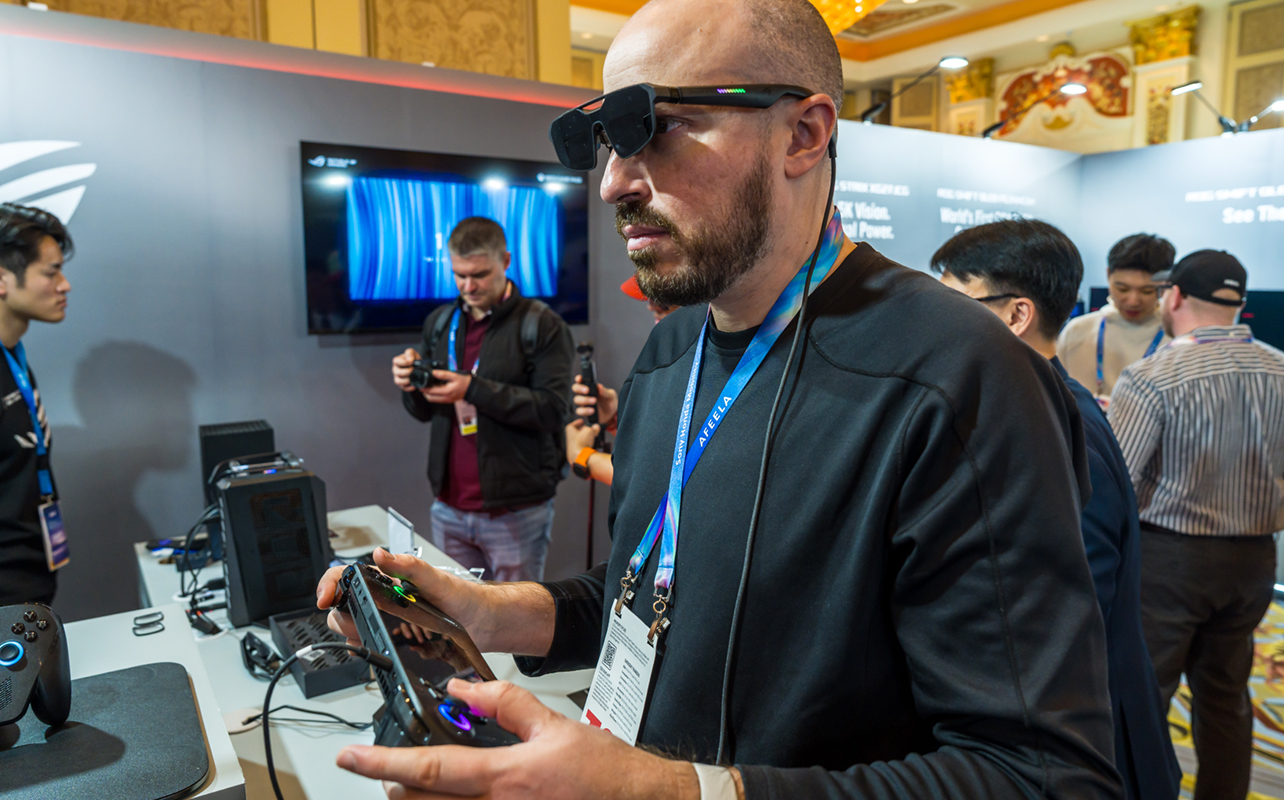
Display/AR smart glasses (augmented reality overlays)
AR smart glasses with display capabilities add a visible layer of information to your vision. Sitting slightly above your line of sight or integrated into the lens, a small projector renders notifications, navigation, performance stats, or a virtual screen that follows your head movement.
These types of smart glasses push the envelope more than the others. Except, there are also different components involved, which is why there may be limitations in battery life, brightness in sunlight, visual comfort during extended use, and social acceptance. Hence, these models tend to cater more to specific use cases, like workouts, travel, tailored work sessions, and entertainment. XReal, Viture, and Rokid are brands currently leading the charge here.
Best smart glasses in 2026 (Top picks)
Best overall smart glasses: Ray-Ban Meta (Gen 2)
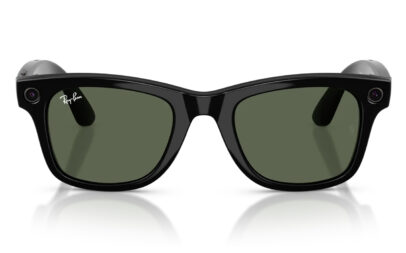
The Ray-Ban Meta collaboration has produced what is, by almost any measure, the best all-around smart glasses available to consumers today. They blend together a design that passes as conventional eyewear with Meta’s fairly deep AI platform — all while finding a genuine mass-market audience because of it.
Key features:
- Charging case included; up to ~4 hours active use, 36 hours total with case
- 12-megapixel camera with 1080p video capture
- Five-microphone array for clear voice commands and calls
- Open-ear directional speakers with improved bass and volume over prior generations
- Full Meta AI integration: open-ended voice queries, visual AI (“look and ask”), web search, real-time translation
- Live streaming to Instagram and Facebook
- Available in multiple frame styles (Wayfarer, Headliner, Skyler, and more)
Pros:
- Look like regular glasses; wear them anywhere without drawing attention
- Meta AI offers useful interactions and improves over time via software updates
- Best camera quality in the consumer smart glasses segment
- Broad frame style selection with classic styles like Wayfarer, Skyler, and Headliner
- Prescription-compatible lenses available
- Solid companion app (Meta AI) on both iOS and Android
Cons:
- Tied to Meta’s ecosystem, so your comfort level with Meta’s systems matters
- Open-ear speakers audible to those nearby at higher volumes
- No visual display — all output is audio-only
- Battery life is fine but not exceptional for heavy AI users
Best For: Users who want an AI assistant and content creation capability in glasses they’d actually choose to wear.
Best smart glasses for athletes: Oakley Meta Vanguard Performance Al glasses
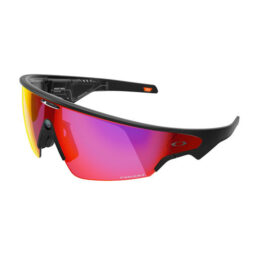
Oakley’s smart eyewear brings together its long-standing performance optics expertise to the smart glasses category. These are clearly built for people who are keeping active, be it running, cycling, skiing, playing tennis, etc., and need wearables that can keep up.
Key features:
- Sport-grade frame construction with impact resistance and sweat/water resistance
- Biometric sensor integration (heart rate, motion analysis) on select models
- Real-time performance coaching delivered via audio
- GPS-connected route navigation for outdoor activities
- Aerodynamic frame design with secure fit systems
- Compatible with sport-specific AI coaching apps
Pros:
- More ruggedly built to withstand conditions most smart glasses aren’t designed for
- Performance data comes in without interrupting activity
- Fits alongside athletic gear naturally; certain models are helmet compatible
- Ergonomics designed for movement, not just sitting at a desk
Cons:
- AI features are sport-specific, so less useful for general everyday tasks
- Style is distinctly athletic, not for office or formal wear
- Higher price point reflects performance hardware
Best For: Runners, cyclists, skiers, and athletes who want real-time coaching and biometric feedback without carrying a phone or wearing a smartwatch.
Best high-tech display glasses: XReal 1S
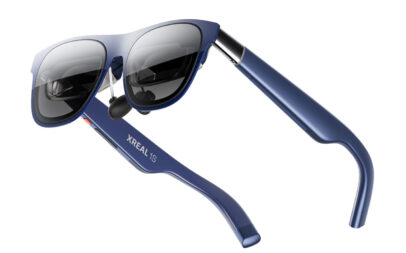
XReal stands out as a leader in AR glasses, and the 1S are probably its most balanced and accessible option. It very much plays in the sandbox of entry-level spatial computing and makes a compelling case for putting this portable virtual display in front of your eyes.
Key features:
- Not too heavy for extended sessions
- 1200p Full HD resolution per eye and up to 700 nits peak brightness
- 52-degree field of view and 16:10 aspect ratio for a wider, more immersive virtual screen
- X1 spatial computing chip with 3ms latency and Real 3D; can convert any 2D content into 3D spatial scenes instantly without special apps required
- 120Hz max refresh rate, making it relevant for both video and gaming
Pros:
- Wide compatibility with Mac, Windows, USB-C iPhones, Android devices, and even the Steam Deck or Asus ROG Ally X.
- 700 nit brightness transforms makes these usable indoors and outdoors
- Real 3D conversion works across different content sources, including YouTube, Netflix, and games
- No subscription required for core functionality
Cons:
- Heavier than audio or AI glasses at 84g; they’re not meant for all-day wear
- Text-heavy productivity work isn’t quite there yet; best suited for video and gaming rather than coding or office tasks
- Requires a tethered connection to a host device, like a computer, phone, or tablet
Best For: Travelers, gamers, and anyone who wants a large virtual screen anywhere they go, and without the bulk or price of a full spatial computing headset like Apple Vision Pro.
Best smart glasses for audio: Bose Frames Tempo/Alto Series
Bose launched smart glasses intending to integrate its known audio quality into eyewear. If your primary need is nothing more than music, calls, and voice assistant access—and you don’t want a camera or complex AI—Bose Frames are the most refined choice.
Key features:
- Bose’s proprietary open-ear speaker system, tuned for rich, directional sound
- Active noise management for calls
- Touch controls on temple arms
- Compatible with Siri, Google Assistant, and Amazon Alexa
- Polarized or photochromic lens options available
- Lighter and slimmer than most AI or AR alternatives
- Up to 5.5 hours playback; charging case extends to ~20 hours total
Pros:
- Objectively the best audio experience of any smart glasses category
- Slim, lightweight design comfortable for all-day wear
- No camera means no privacy concerns for those around you
- Excellent call quality with noise-rejecting microphones
- Style-forward designs available in multiple frame shapes
Cons:
- No onboard AI beyond voice assistant pass-through
- No camera or visual display
- Limited app ecosystem compared to AI-first competitors
- Premium pricing for an audio-only experience
Best For: Music lovers, frequent phone-call users, commuters, and anyone who wants the benefits of open-ear audio in a glasses form factor without the complexity of AI or AR.
Best budget smart glasses: Ray-Ban Meta (Gen 1)
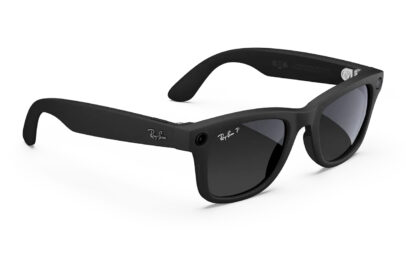
The smart glasses market now has a more bona fide entry-level tier. Starting under $300, the Ray-Ban Meta Gen 1 offer the full Meta AI experience at the floor of the lineup. Plus, the same classic frame styles (Wayfarer, Headliner) are available.
Pros:
- 12MP camera for photos and video clips
- Built-in open-ear speakers and five-microphone array for calls and voice commands
- Touch controls on the right temple arm
- Compatible with Meta AI app on iOS and Android
- No subscription required for core features
- Still available in classic Ray-Ban frame styles like Wayfarer and Headliner
- Prescription lens compatible through Ray-Ban
Cons:
- 1080p video cap falls behind most smartphones
- Speaker and microphone quality also improved noticeably in Gen 2
- Newer lineup offers more colour and style options
Best For: First-time smart glasses buyers, budget-conscious consumers, and anyone wanting to try the category before committing to a premium model.
Key features to look for in smart glasses
Display quality
If you’re considering AR or display smart glasses, display quality is the main metric. Others include brightness (measured in nits), which matters more for outdoor use. Resolution matters, too, though 1080p per eye is the current standard for good quality display glasses. Lower than that likely produces pixilated text and images. The Field of view (FoV) is how large the virtual display appears, and 50+ degrees is the ideal sweet spot right now. For colour and contrast, Micro-OLED displays give you the best of both, while waveguide-based systems aren’t as rich. AI and audio glasses aren’t relevant for display quality.
Audio performance
Smart glasses audio can only take you so far. They can’t match the immersion and volume of a pair of high-end earbuds or headphones. And since they’re open-ear, it’s always a compromise between speaker quality and social discretion given how sound leaks to those around you at higher volumes. Audio-first glasses should do better with bass response and call clarity, whereas AI glasses should have better microphones and voice recognition.
Camera capabilities
It’s hard to know for sure what kind of quality you’ll get but you can get clues by seeing what others post online, or even trying on a pair in-store. At this point, 12-megapixels is the current standard for photos, with 1080p or 4K video also available. Your mileage may vary in low-light and night conditions, and that’s where more expensive pairs sometimes show their worth.
For AI vision tasks, like object recognition, scene description, and translation, camera quality matters less than the quality of the AI pipeline processing the image. To put that in perspective, an 8-megapixel camera with excellent AI will outperform a 12-megapixel camera paired with a poor visual AI model.
Battery life
Battery life is the most frequently cited frustration with smart glasses. Here’s what to realistically expect from the current generation:
| Use Mode | Typical Range |
| Audio / basic features | 4–8 hours |
| AI assistant (voice queries) | 3–5 hours |
| Camera / video capture | 1.5–3 hours |
| AR display (active) | 2–4 hours |
| With charging case (total) | 24–36 hours |
Wear them often and you should be prepared to charge every day. If battery life is a top priority, audio-only smart glasses tend to outlast AI or display-equipped models because they’re powering less hardware.
Connectivity
All consumer smart glasses use Bluetooth as their primary smartphone connection. More often than not, that will be version 5.2 or higher for better stability and audio quality. You may also have the ability to connect to two devices simultaneously (laptop, phone, etc.). Wi-Fi is necessary to do things like live streaming, cloud AI processing (without the phone) and receive over-the-air firmware updates.
Compatibility (iPhone vs Android)
The majority of smart glasses support both iOS and Android through a companion app, but the experience may lean towards one platform in some respects. Glasses with access to Google Gemini will deliver better AI output than what Siri can do alone. If you have ChatGPT working with Siri, that can even the odds a little. How that works can affect hands-free messaging as well.
Some manufacturers develop newer settings or features for iOS first before doing it for Android. That’s not always the case in this particular category but it does happen. AR glasses that connect via wired USB-C are fine with Android devices that adopted the standard long before Apple did. iPhone 15 or later make that convenient whereas earlier models don’t. Make sure to confirm what you have before diving in.
Style and comfort
Style is obviously a key factor for glasses meant for everyday wear. Less so for AR glasses that aren’t. One is supposed to look good on you, whereas the other is supposed to do a great job in front of your eyes. Under 50g is ideal for all-day comfort, and more audio and AI glasses are right in there. AR glasses are routinely heavier than that.
Smart glasses generally come in one or two sizes, not like how conventional eyewear have a wider size range. Try to look out for measurements. Ray-Ban Meta support Rx lenses but not all smart glasses do. If you wear prescription glasses, this may be your single most important filter.
Smart glasses vs smartphones vs headsets
When smart glasses replace phones
Smart glasses don’t replace smartphones. The technology simply isn’t there yet. But they can impact how often you reach for your phone. If the glasses can answer a question while your hands are full (cooking, exercising, driving, repairs), then the phone doesn’t need to move at all.
It’s easy to skip a track or answer a call when listening to music or talking with someone. Same with turn-by-turn directions when navigating streets in a strange city without touching your phone. Photo capture, real-time translation—these are the scenarios where the connectivity makes a difference.
Limitations vs smartphones
The smartphone is still indispensable in many respects. You still need the phone screen to read, browse, watch video, or review photos with the utmost quality in mind. Smart glasses can’t replicate the vibrancy of a 6+-inch high-resolution display.
The phone also acts as the arbiter for everything. It’s where you get your apps from, where you apply settings, and what actually feeds smart glasses’ features, in most cases. Any sort of gesture input, be it tapping, swiping, or troubleshooting, usually means doing it manually through the phone itself.
Smart glasses vs VR headsets
These really are two different worlds because they simply don’t do the same things. VR headsets immerse you in a virtual space, where you are isolated to focus on whatever content you’re interacting with. You never wear them for a walk or commute, given how large and cut off from the real world they are.
Smart glasses are lightweight and designed to augment your real-world experience, not replace it. You can wear them all day or hold a conversation while wearing them. AR glasses, however, are a grey area in between. Devices like those from XReal and Viture project a virtual screen that presents you with content you want to watch, only without the full virtual immersion or isolation. And because they’re smaller, they’re easy to pack and take with you.
How to choose the best smart glasses
Based on your budget
Under $400: Ray-Ban Meta Gen 1 pairs stand out but they’re not necessarily the only ones. Make sure to check. You’re getting real functionality with an AI assistant, audio, and camera without a premium price. Start here if you’re new to the category.
$400–$600: Mid-range AI glasses (Oakley Meta HSTN glasses, Bose Frames). This range unlocks better audio hardware, more frame options, and purpose-built sport features.
$600–$900: Performance sport glasses, advanced audio systems, and entry-level AR display glasses (Ray-Ban Meta Gen 2, Oakley Meta sport models, XReal 1S, XReal One Pro, Viture Pro). At this price, you’re paying for specialized hardware quality.
Based on your use case
This largely depends on what you feel matters most. If a daily AI assistant is key, the Ray-Ban Meta offer the best combination of design, AI capability, and everyday usability. But if you want a sporty approach, the Oakley Meta lineup is well-suited for that.
The XReal 1S, on the other hand, won’t be confused for either of those. As AR glasses, they’re meant for sit-down and relaxed experiences, like watching a movie, show, or gaming. You could even try your hand with a pair when it comes to productivity. And since pairs like that don’t have cameras, they serve no real purpose for content creation in that regard.
Pairs that do have cameras can certainly impact what kind of content you can produce. With that in mind, the Ray-Ban Meta Gen 2 lineup is unmatched for first-person video and live streaming capabilities at its price range. Those cameras can also be very useful for those who need an accessibility assist, like scene description, translation, and real-time information.
Based on device compatibility
Regardless of whether you’re an iOS or Android user, confirm compatibility before buying. All the aforementioned brands support both, though Android holds an edge with broader compatibility due to Apple’s ecosystem restrictions, particularly on third-party and audio and messaging.
If you’re thinking computers, XReal and Viture are better suited for that. They can plug in seamlessly and feel like immersive ways to watch content, play games, or work on something work-related.
Based on style preferences
It’s hard to match the Ray-Ban Meta line for sheer everyday style and fashion. A storied brand like Ray-Ban gives these smart glasses instant credibility from that standpoint. That also goes for Oakley and its sport-focused legacy.
Beyond that, style matters less the more focused smart glasses get on AR, for example. While XReal and Viture constantly look for ways to shed size and weight, their fashionable prospects are less about looks and more about comfort. Audio smart glasses, on the other hand, are a mix of both. They should be comfortable enough to wear for long stretches but also can’t match the pure fashion street cred of brands like Ray-Ban and Oakley.
FAQs about smart glasses
Yes. Major smart glasses brands support iOS through companion apps available on the App Store. Ray-Ban Meta pairs with the Meta AI app, Bose Frames use the Bose Connect app, and XReal uses the Nebula app, all of which are iOS-compatible.
That said, some features work differently on iPhone vs Android. iMessage integration for hands-free texting is more limited on iOS due to Apple’s messaging restrictions, and some third-party AI features depend on app permissions that Apple regulates more tightly. If you’re an iPhone user, read reviews from iOS users specifically rather than assuming the Android experience applies equally.
For many, yes. The category has reached a level of maturity where there’s a real value proposition, particularly for audio-first use and AI-assisted daily use. Smart glasses can genuinely feel like a solution when you want to do things without pulling out your phone. The catch is that the glasses usually need your phone to handle connectivity and content. That’s why they won’t replace a smartphone, but will rather complement it.
Most camera-equipped smart glasses (Ray-Ban Meta, Oakley AI, and others) can record video. The Ray-Ban Meta captures 1080p video directly from the frame, synced to your phone via the companion app. Gen 2 models also support live streaming directly to social platforms. For recorded clips, video files typically store on the companion app where you can then export them like any other video. Indicator lights, like an LED on the front of the frame, makes recording visible to those around you.
“Smart goggles” are generally either AR/VR goggles or sport-specific smart glasses with goggle-form-factor designs for activities like skiing, cycling, or swimming. In the broader AR space, devices like Microsoft HoloLens represent full spatial computing devices worn on the face for virtual reality and immersive applications.
Smart goggles within a sporting context could include ski goggles with built-in displays that overlay run tracking, speed data, and navigation on top of your natural vision. Breaking it down with form factor, goggles wrap around the eyes and face, whereas glasses with frames sit more like standard glasses.
How we decide what’s best
At Best Buy Canada, curating a “Best of” or “Top X” list is a thoughtful and transparent process. We evaluate products based on brand reputation, popularity, customer interest, and relevance within their category. Our bloggers then bring deep product knowledge and hands-on experience to help identify the best options for you.
Testing goes far beyond unboxing—products are used in real-world scenarios, with our bloggers putting themselves in your shoes to better understand how a device or accessory performs day to day and whether it meets expectations. Where possible, they compare similar models and assess key factors such as design, performance, and category-specific features to offer well-rounded, informed recommendations. For niche or new product categories where broader hands-on testing might not be possible within that category as a whole, our skilled bloggers evaluate the products using every objective method they can.
In some cases, a blogger may not have direct experience with a specific product. When that happens, they draw on broader expertise, such as time spent with comparable items, an understanding of the brand’s current lineup, and its overall reputation. We also draw on insights from Best Buy’s in-house category experts and aggregate feedback from both trusted reviewers and customer ratings to make the best selections.
We’ll always be clear about the basis of our recommendations—whether they stem from first-hand testing or extensive research. Authenticity matters to us. Every “Best of” guide is built on objective insights, product knowledge, and a commitment to helping you make confident buying decisions.