Shopping for an HDMI cable should be simple, but anyone who has wandered into an electronics aisle knows it can get overwhelming fast. Rows of cables with different labels, speeds, lengths, and prices can turn a quick errand into a small puzzle. Maybe you’ve even stood there wondering which one will actually work for your TV, soundbar, or gaming console.
If you’ve ever thought, “Why are there so many options?” or “Do I really need the pricey one?”, you’re not alone. These questions come up all the time, and that’s exactly why this guide exists.
So let’s break it all down and cover everything you need to know about HDMI cables—even the things you were afraid to ask. By the time you’re done, you’ll know what the labels mean, which cable you actually need, and when the extra features really matter.


What is HDMI?
HDMI stands for High Definition Multimedia Interface. It was created to replace bulky and limited connectors like component video and DVI. What makes HDMI special is that it sends both video and audio through one cable. This makes setup cleaner and reduces the need for multiple cords hanging behind your TV.
Modern HDMI supports high-resolution video formats, surround sound audio, HDR (High Dynamic Range), and device communication features. These extra features help your TV and connected equipment work together more smoothly. For example, CEC lets you control compatible devices with a single remote, and the Data Channel allows devices to recognize each other’s capabilities.
As TVs, monitors, and consoles have advanced, HDMI has evolved to keep up. Today it is the standard connection for everything ranging from Blu-ray & DVD players and streaming devices to home theatre receivers, projectors, and even some laptops.
HDMI cable categories and what they mean
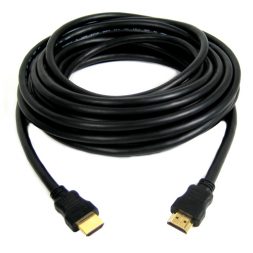
It is easy to assume HDMI cables are all the same, but they are grouped into performance levels. Each category represents the amount of data the cable can carry. Higher bandwidth means the cable can support higher resolutions, faster refresh rates, and more advanced features.
Standard HDMI Cable
Standard cables were designed for early HDTVs. They support 720p and 1080i resolutions, which were the most common formats at the time. These cables are rarely recommended today because modern TVs, monitors, and players usually require much higher bandwidth.
High-Speed HDMI Cable
High-Speed cables support 1080p video, 4K at 30Hz, and most basic HDR formats. They are suitable for Blu-ray players, older 4K TVs, and basic streaming devices. These cables are very common and usually work well for simple home entertainment setups.
Premium High-Speed HDMI Cable
Premium High-Speed cables are certified to handle 4K at 60Hz with HDR10 or Dolby Vision. They offer more consistent performance on modern 4K TVs. If you are streaming 4K content, watching UHD discs, or using a set-top box that supports HDR, this level is a safe bet.
Ultra High-Speed HDMI Cable
Ultra High-Speed cables are the newest certified category. They support HDMI 2.1 features such as 4K at 120Hz, 8K at 60Hz, dynamic HDR formats, variable refresh rate, and eARC. These cables carry far more bandwidth and are ideal for gaming consoles like PlayStation 5 and Xbox Series X, high-end PC graphics cards, and any 8K or advanced 4K television.
Choosing the correct category for your device ensures you get the performance you expect without signal loss or compatibility issues.
HDMI connector types
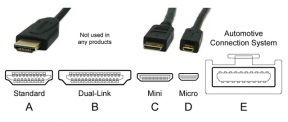
Most HDMI cables use the full-size Type A connector found on TVs, soundbars, receivers, gaming consoles, and streaming devices. However, HDMI also comes in smaller sizes for portable equipment.
- Type A is the standard connector used in most home entertainment systems.
- Type C is the Mini HDMI connector, used in some cameras and tablets.
- Type D is the Micro HDMI connector, found on certain action cameras and compact devices.
- Type E is an automotive connector designed to withstand vibration and temperature changes inside vehicles.
Knowing which connector your device uses prevents you from buying the wrong cable.
Understanding HDMI versions
You may see references to HDMI 1.4, HDMI 2.0, or HDMI 2.1 when researching cables or devices. These version numbers refer to the capabilities of the devices, not the cables themselves. Although the versions introduce new features, the cable category is what determines real-world performance.
- HDMI 1.4 introduced early 4K support, 3D video, and an optional Ethernet channel within the cable.
- HDMI 2.0 increased bandwidth to support smooth 4K playback at 60Hz and improved colour depth.
- HDMI 2.1 added support for 4K at 120Hz, 8K displays, dynamic HDR, variable refresh rate, and advanced sound features like eARC.
- HDMI 2.1a built on 2.1 and added Source-Based Tone Mapping, which improves HDR accuracy.
Older HDMI cables can still work with newer devices, but the performance will be limited to the cable’s capabilities.
Do more expensive HDMI cables perform better?
It is a common belief that premium HDMI cables offer superior picture and sound quality compared to affordable ones. In reality, a properly certified cable will deliver the same picture quality as a more expensive one, as long as both support the required bandwidth.
Higher-priced cables usually focus on durability. They may include braided exteriors, reinforced connectors, or thicker insulation. These features can help the cable last longer, especially in setups where cables are moved frequently or routed through tight spaces.
For most home setups, a certified cable in the correct category will give you the same visual and audio performance as a premium alternative.
![Silkland 4K HDMI Cable 6.6ft, High Speed HDMI 2.0 Cables [Gold Plated, Nylon Braided] HDMI ARC Cord, HDR 4K@60Hz, 2160/1080P, 18Gbps, Compatible for Xbox PS5 Fire TV SoundbarSilkland 4K HDMI Cable 6.6ft, High Speed HDMI 2.0 Cables [Gold Plated, Nylon Braided] HDMI ARC Cord, HDR 4K@60Hz, 2160/1080P, 18Gbps, Compatible for Xbox PS5 Fire TV Soundbar](https://blog.bestbuy.ca/wp-content/uploads/2018/06/19616005-253x253.png)
Should you look for gold-plated connectors?
Gold-plated connectors resist corrosion better than standard metal connectors. This can be helpful in environments with high humidity or where cables will be installed for long periods without being touched. Gold does not improve image quality or speed, but it does offer better long-term durability.
How long can an HDMI cable be?
Cable length affects signal strength. Shorter HDMI cables usually work without trouble, while very long cables may need additional support to maintain performance.
Here is what you can expect regarding length:
- Up to 25 feet works reliably for most cable categories.
- Between 25 and 50 feet may require a better quality cable to reduce signal loss.
- Beyond 50 feet often needs an active HDMI cable, HDMI over Ethernet, or an extender to ensure the signal travels without degradation.
For home theatres with components spread out, active and boosted HDMI options help maintain stable video and audio.
Do you need HDMI cables with Ethernet?
Some HDMI cables include an Ethernet channel to allow connected devices to share a network connection. It is a rarely used feature, as most devices rely on Wi-Fi or a direct Ethernet connection instead. It does not affect picture or sound quality, so it is not a requirement, but having it does not cause any issues either.
What is eARC and why does it matter?
eARC stands for Enhanced Audio Return Channel. It allows your TV to send high-quality audio to a soundbar or receiver. This includes formats like Dolby Atmos, Dolby TrueHD, and DTS-HD Master Audio. If you want the best possible sound from streaming apps or an 8K TV, make sure your HDMI cable supports eARC. Ultra High-Speed HDMI cables include this support automatically.
Which HDMI cable is right for your setup?
Here is a simple recommendation guide based on what you own:
- For a 1080p TV, a High-Speed HDMI cable is enough.
- For a 4K TV used mainly for streaming, a Premium High-Speed cable is a good match.
- For gaming at 4K with 60Hz and HDR, use a Premium High-Speed or Ultra High-Speed cable.
- For gaming at 4K with 120Hz or any 8K content, choose an Ultra High-Speed cable.
- For soundbars or receivers that require eARC, use an Ultra High-Speed cable to unlock full audio quality.
Choosing the cable that aligns with your equipment helps avoid bottlenecks and ensures everything works smoothly.
HDMI cables in summary
HDMI cables may look identical, but the specifications behind them make a big difference depending on the devices you use. Once you understand the cable categories, connector types, and the features that come with newer standards, choosing the right one becomes much easier. Whether you need something simple for an older TV or a high-bandwidth cable for next-generation gaming and home theatre system, there is an HDMI option that fits your setup perfectly.
Do we have a better understanding of HDMI cables? Did we miss something, or leave out some important info that would be crucial to a purchase? Let us know in the comment section below, and don’t forget to take a look at the HDMI cables available online at Best Buy.